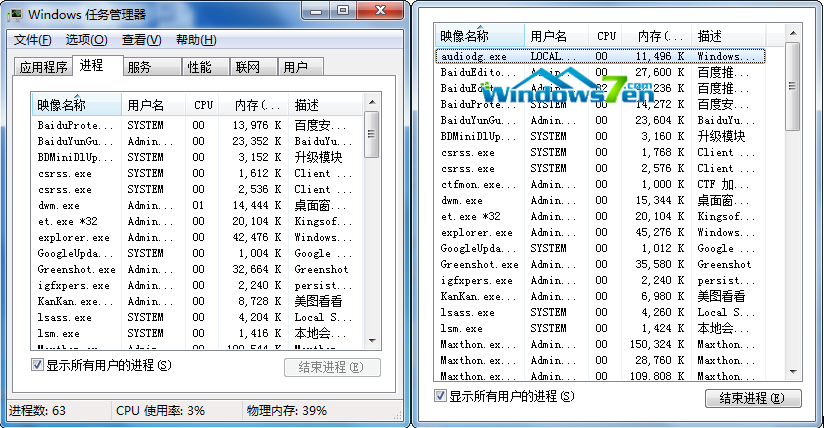
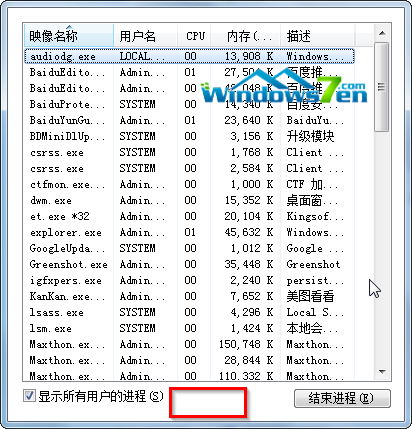
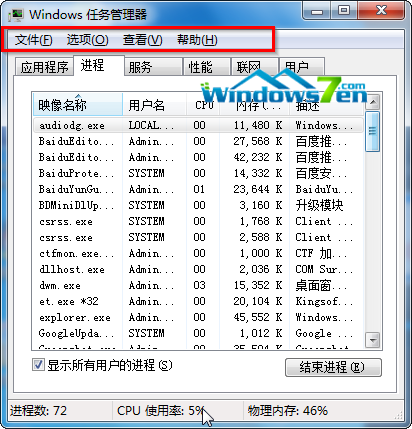
Windows 7 任務管理器若不小心雙擊了標題列或邊框,會進入「精簡模式」隱藏選單列與頁籤。解決方法極簡單:在任務管理器空白處(標題列下方灰色區域)雙擊滑鼠左鍵,即可瞬間恢復完整介面。
正常模式:有選單列、頁籤(應用程式、處理序、效能等)。
精簡模式:無選單列、無頁籤,僅顯示單一清單。
Win7 非正常關機後開機提示「延遲寫入失敗」解決:磁碟檢查與 chkdisk 修復
微軟官方釋出 Windows 10 專業版免費升級金鑰:VK7JG-NPHTM-C97JM-9MPGT-3V66T (僅限 1511 家用版升級,仍需購買授權啟用)
Windows 10 Build 10041 新功能:全新手寫輸入辨識畫板上線,支援候選詞與扁平化介面
Win10 預覽版 Build 9924 官方下載地址:版本號確認、Cortana 專屬版本、與 awesome 版差異
Win8.1 不用第三方軟體給資料夾加密隱藏:批次檔 + 系統屬性雙重保護
Win10 熱度太高引來詐騙!假冒微軟郵件夾帶比特幣勒索病毒