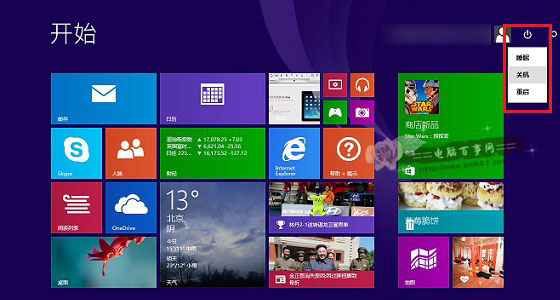
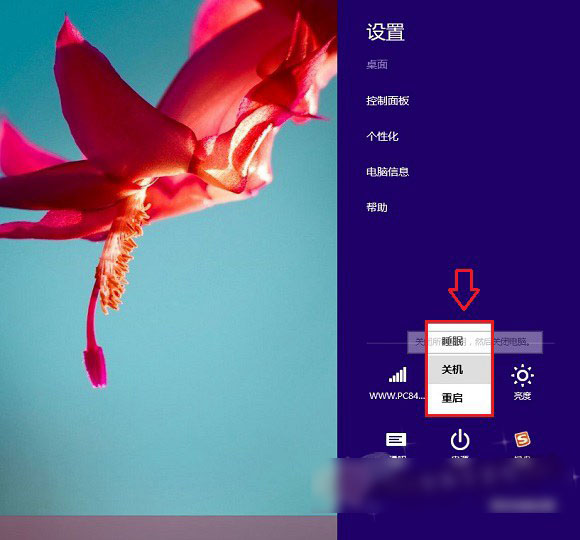
Windows 8/8.1 開始畫面電源選單與設定中均無「登出」選項(僅有睡眠/關機/重新開機),許多使用者找不到登出入口。實際上可在傳統桌面按 Alt+F4(或 Win+F4)叫出「關閉 Windows」對話框,下拉選單即可選擇「登出」。
現象說明
開始畫面電源按鈕:僅睡眠/關機/重開機。
設定 → 電源:同樣無登出選項。
解決方法
- 回到傳統桌面(Win+D 或點選桌面磚)。
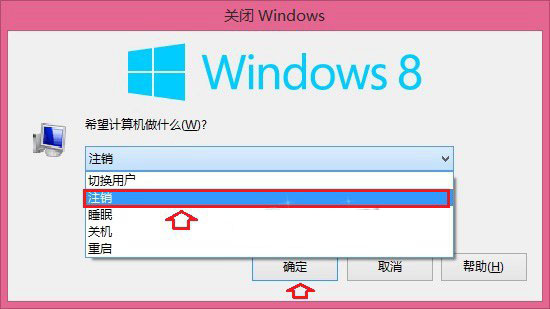
- 按 Alt+F4(或 Win+F4)組合鍵。
- 彈出「關閉 Windows」對話框,下拉選單選擇 「登出」 → 確定。
補充說明
- 此為 Windows 8/8.1 設計特性,登出功能隱藏於桌面關機對話框中。
- Windows 10 開始選單已恢復直接可見的「登出」按鈕(開始 → 使用者圖示 → 登出)。
- 適用於 Windows 8 與 8.1 所有版本。