安裝雙系統(如 Win 7 + Win 8/10)後,預設開機項目通常為最後安裝的系統。若想將 Windows 7 設為預設啟動,可透過「系統屬性」或「系統設定 (msconfig)」修改開機選單預設值。
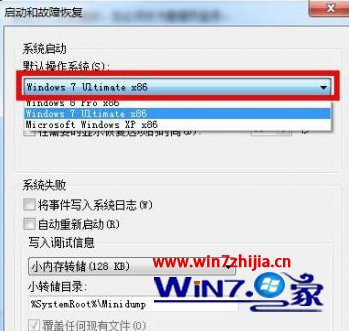
方法一:系統屬性(圖形介面,直觀)
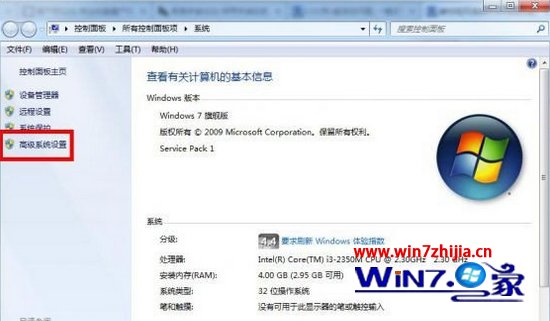
- 右鍵「電腦」→「內容」→ 左側「進階系統設定」。
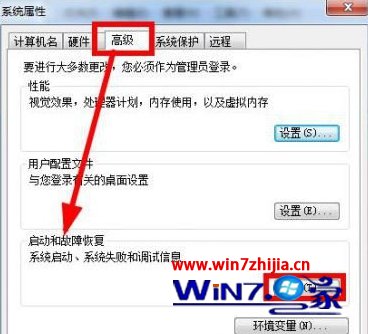
- 「進階」頁籤 → 「啟動與修復」區塊 → 「設定」。
- 「預設作業系統」下拉選單選擇 Windows 7 → 確定 → 確定。
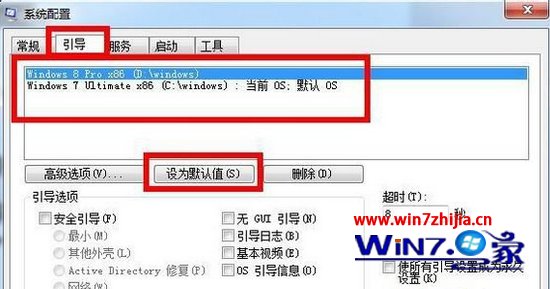
方法二:msconfig 系統設定(快速、適用所有版本)
- 按 Win+R → 輸入
msconfig → Enter。
- 「開機」頁籤 → 選擇欲設為預設的項目(Windows 7)→ 點選「設為預設」→ 確定 → 重新啟動。
補充說明
- 「逾時」秒數可調整開機選單顯示等待時間(預設 30 秒,建議 5-10 秒)。
- 若開機選單項目遺失,可在 msconfig「開機」頁籤檢查是否被隱藏,或使用
bcdedit 指令修復開機配置資料 (BCD)。
- 此設定修改的是 BCD 存儲中的
default 項目,不影響各系統內部檔案。