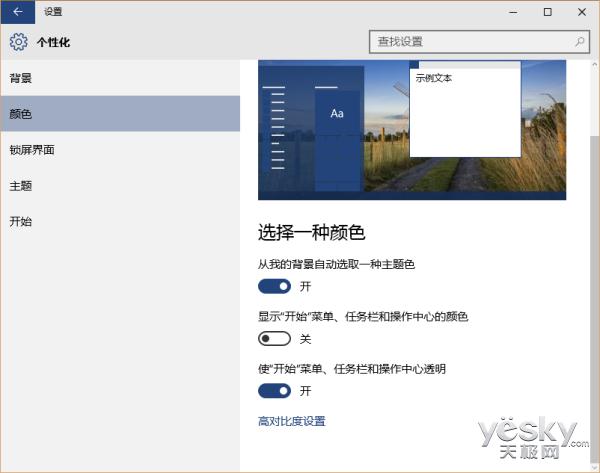
新硬體跑 Win10 如飛,但舊筆電(Core M 系列、老款 Core i7)常感遲滯。VLC Windows Modern 開發負責人 Thomas Nigro 建議:
實測:關閉透明效果後,舊機運作明顯順暢。高階機種若追求極致效能同樣適用。透明效果對 GPU/合成器有持續負擔,關閉即釋放資源。
距正式版不到兩個月,微軟持續優化中,正式版效能預期優於預覽版。
Windows Update錯誤 80070422 解決:重置Windows Update服務啟動類型與狀態
Win10 通用應用首批合作夥伴曝光:Adidas、Autodesk、Evernote、騰訊微信等大牌入列
Win10 便箋升級為 OneNote?啟用雲端同步與跨裝置筆記完整教學
Windows 10 日本專屬萌娘化角色「Win10娘」設定公開
Win7 透過群組原則限制僅允許指定 USB 隨身碟存取,阻擋不明裝置防資料外洩
微軟向 Win10 Build 10240 推送修正版更新 KB3074680
Win10 桌面圖示盾牌圖示移除法:下載 BAT 執行即可
想升級 Win10?先搞懂這些關鍵準備工作與注意事項