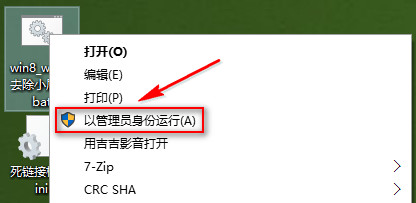
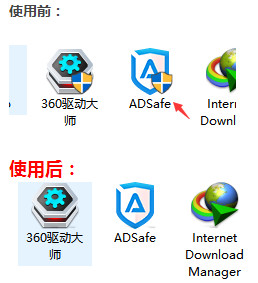
Win10 安裝軟體後圖示出現盾牌(UAC 使用者帳戶控制標誌),雙擊會彈出確認視窗。潔癖用戶可下載移除工具:
win8_win10去除小盾牌.bat
下載連結:https://www.jb51.net/softs/370836.html
一鍵移除圖示盾牌,乾淨桌面即刻擁有。
Win10 以管理員身分開啟命令提示字元的四大技巧(含工作管理員神技)
Win10 Microsoft 管理主控台停止運作?乾淨啟動排除衝突 + 系統修復
Win10 14295 無法連接 Miracast WiFi 接收器?登錄表修改 IP 秒解
Win10 登入背景修改失敗閃屏無限循環?PE 模式還原系統檔案完整救援教學
Windows 10 硬體需求大公開:5年內舊電腦也能順暢升級
Win10 RedStone 14271 任務列屬性新增「設定」選項:工作列設定正式遷移至設定 App
Windows 10 開機提示「關鍵錯誤」解決:啟用 User Manager 服務
Win10 如何用語音指令 Cortana (小娜) 關機?建立捷徑啟用語音關機功能