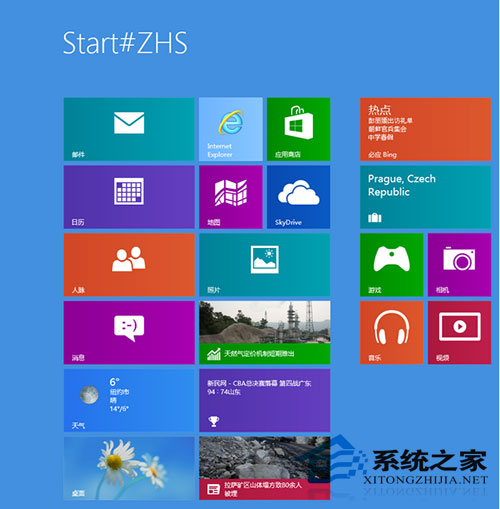
Win8 開始畫面出現「Start#ZHS」亂碼,主因:安裝大量第三方字體意外覆蓋系統字體,且 Win8 對第三方字體相容性較差。解決:下載 Win8 原版字體覆蓋至 C:\Windows\Fonts 重開機即可。非硬體故障,單純字體衝突。
C:\Windows\Fonts
切勿隨意替換系統字體,保持原版字體穩定最省心。
Win8 如何將時間格式從 12 小時制改為 24 小時制?區域設定圖文教學
Win10 DPI 縮放機制深度解析:為何高分屏字體變模糊?附修正工具下載
Win10 Mobile/PC 版 MSN 系列通用 App 獲更新:新聞、財經、天氣、運動同步優化
Windows XP 無法安裝 iTunes?完整排除與安裝教學
Win7 無法將程式釘選到工作列?修復 piffile 與 lnkfile 登錄鍵值解決
Win10 Nvidia 控制台無法開啟/無回應?結束 user 開頭的顯卡進程暫時解決
Win8.1 筆電拔掉電源瞬間黑屏?統一電池/交流電模式下的螢幕重新整理率解決
Windows 7 解決登錄被管理員停用:VBS 腳本與群組原則雙重修復