Windows XP Windows 7 Windows 2003 Windows Vista Windows 綜合教學 Linux 系統教學
Windows 10 Windows 8 Windows 2008 Windows NT Windows Server 電腦軟體教學
您现在的位置: Windows教程網 >> Windows教程 >  >> Windows 綜合教學 >> 關於 Windows

解決 Win8 出現 Runtime Error 錯誤:註冊 Msxml3.dll 或重設 IE 瀏覽器進階設定

編輯:關於 Windows

Win8 執行特定程式或開啟瀏覽器時彈出 Runtime Error: this application has requested the runtime to terminate it in an unusual way,提供兩種修復方案。

方法一:命令提示字元註冊 Msxml3.dll

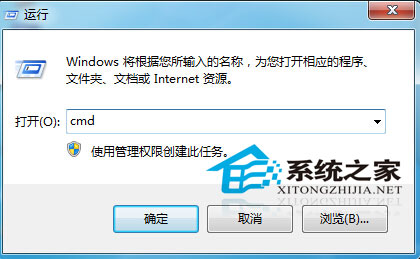
  1. 開啟「執行」(Win+R),輸入 CMD 按 Enter。
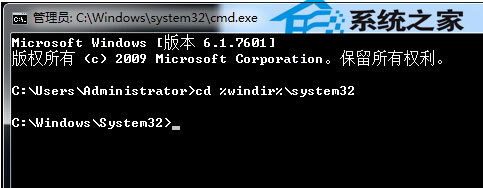
  2. 輸入 cd %windir%\system32 按 Enter,切換至系統目錄。
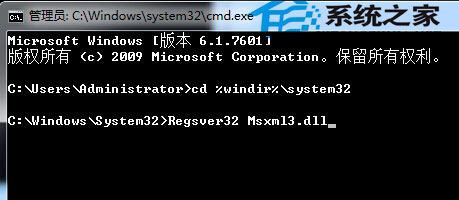
  3. 輸入 Regsvr32 Msxml3.dll 按 Enter,等待註冊完成。

開啟 CMD
cd system32
註冊 Msxml3.dll

此法適用於程式本身觸發的 Runtime Error。

方法二:重設 IE 瀏覽器(適用於瀏覽器觸發錯誤)

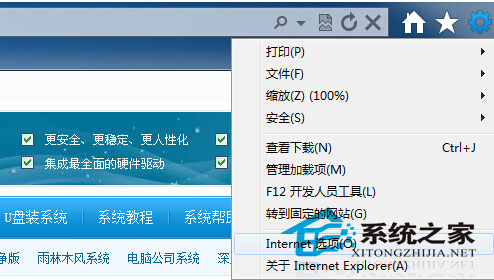
  1. 開啟 IE →「工具」→「網際網路選項」。
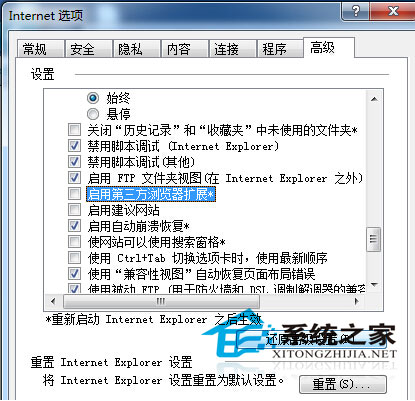
  2. 切換「進階」分頁,取消勾選「啟用第三方瀏覽器擴充功能」。
  3. 點擊「還原進階設定」與「重設」,確定儲存。

IE 選項
重設 IE 進階設定

兩種情境對應不同修復法,依實際狀況選擇操作。

Copyright © Windows教程網 All Rights Reserved