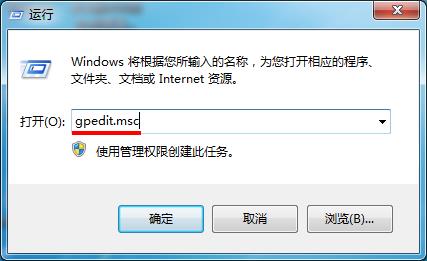
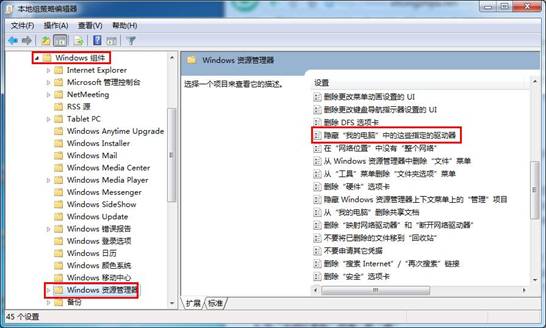
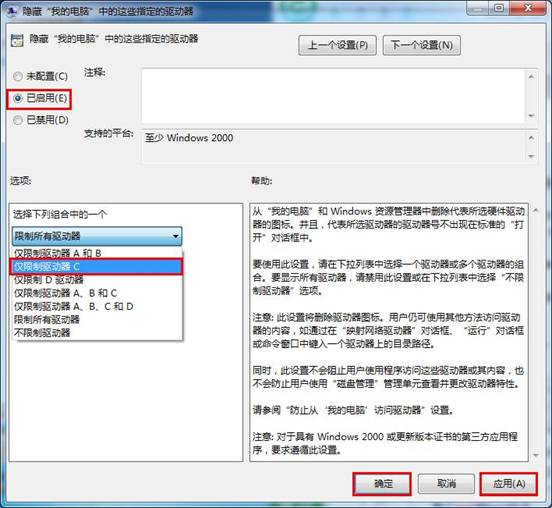
Win7 可透過群組原則隱藏指定磁碟分割區,防止他人在檔案總管看到 (但 IE 輸入磁碟代號仍可存取)。
gpedit.msc
注意:IE 輸入 C: 仍可繞過限制存取。
C:
Windows 10 找不到 IE 瀏覽器?兩大啟動法 + 設為預設瀏覽器教學
Windows 8 建立 VPN 虛擬網路連線教學:適用企業遠端辦公
Win10 預覽版升級正式版教程:微軟確認自動升級,無需預約
Win7 設定桌面背景自動輪換:建立資料夾→個人化→幻燈片播放完整教學
Win10 通用應用首批合作夥伴曝光:Adidas、Autodesk、Evernote、騰訊微信等大牌入列
Win10 安裝 Windows Phone Recovery Tool 失敗?三大常見錯誤與修復
關機變重開機?五大常見原因與完整解決方案總整理
Win8 取消 Windows Media Player 為預設播放器,改用第三方播放器