Windows 控制台 (MMC) 位於 C:\Windows\System32\mmc.exe,可建立、儲存、開啟管理單元管理硬體、軟體、網路元件。
C:\Windows\System32\mmc.exe。mmc → Enter。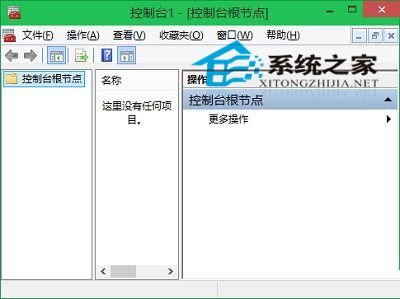
善用「執行」指令可大幅提升系統管理效率,建議常用工具建立捷徑。
Win7 混合睡眠模式啟用教學:powercfg -h off 開啟選項,兼具睡眠速度與斷電保護
Win10 Mobile 10149 更新修復內容完整彙總:Edge 瀏覽器、Cortana、相簿 GIF、OneDrive 自動上傳
Win7 攝影機圖示不見了?兩種方法找回:下載 amcap 建立捷徑、或透過裝置和印表機建立桌面捷徑再移至 Network Shortcuts
Windows 10 變更 Microsoft 帳號 PIN 碼完整教學
Windows 7 開機網路圖示持續轉圈卡頓?卸載驅動精靈並啟用 Network List Service 解決
Win10 工作列「檔案總管」預設開啟「主頁」?改成「這台電腦」快速存取
Windows 9 通知中心曝光:類 Android/iOS 設計、支援分類、一鍵清除、下拉展開
Win7 开关机蓝屏 runtime error → 0x3B 修复:最后正确配置 → 替换 ntoskrnl.exe/win32k.sys → 更新显卡主板驱动