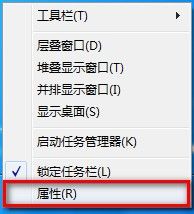
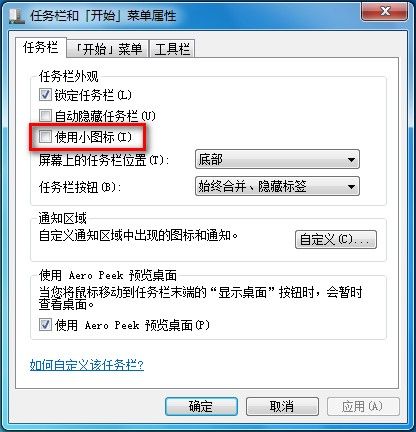
Windows 7 工作列支援「大圖示」與「小圖示」兩種模式,切換方式極簡單:
Win10 關閉 Cortana 搜尋列:改為圖示或完全隱藏
Win10 Build 9879 任務列搜尋按鈕改為搜尋列,登錄表解鎖教學
Win10 如何檢查與安裝系統更新?更新與安全性設定完整圖解
Windows Server 2003 網路伺服器安全佈署完整攻略
解決 Windows 7 登入顯示「您已使用暫時設定檔登入」問題
Windows 10 應用程式安裝位置修改完整教學:釋放 C 槽空間
Windows 7/8 安全移除 USB 裝置後自動關閉電源的註冊表設定
Windows 系統變慢原因分析與優化對策完整指南