Windows XP Windows 7 Windows 2003 Windows Vista Windows 綜合教學 Linux 系統教學
Windows 10 Windows 8 Windows 2008 Windows NT Windows Server 電腦軟體教學
您现在的位置: Windows教程網 >> Windows教程 >  >> Windows 綜合教學 >> 關於 Windows

Windows 8 家庭安全功能 (兒童帳號) 設定教學:網頁篩選、使用時間限制、應用程式管控全方位守護

編輯:關於 Windows

Win8 內建「家庭安全」讓家長管控孩子上網:

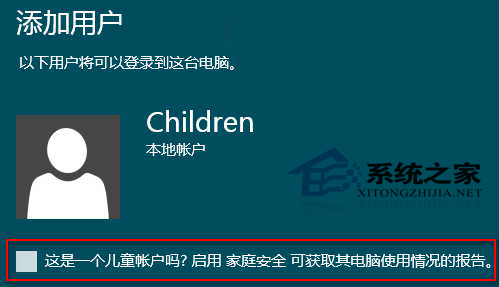
  1. 「電腦設定」→「使用者」→「其他使用者」→「新增使用者」→「本地帳戶」→ 命名 (如 Children) → 勾選「這是兒童帳戶嗎?啟用家庭安全...」。
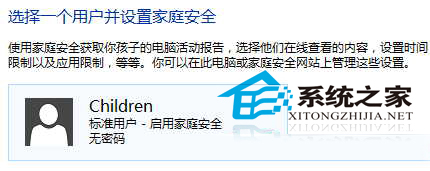
  2. 控制台 → 「使用者帳戶與家庭安全」→「家庭安全」→ 點擊兒童帳戶。
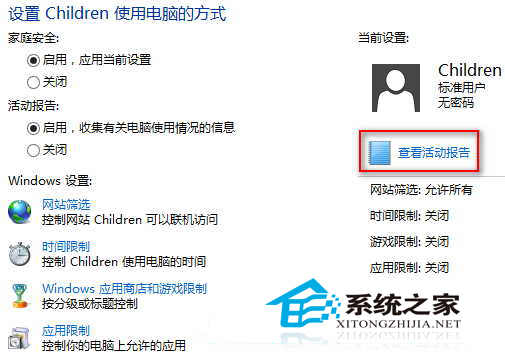
  3. 設定:啟用活動報告、網頁篩選 (允許/封鎖清單)、使用時間限制 (時段/時長)、Windows 市集/遊戲分級限制、允許執行的應用程式清單。
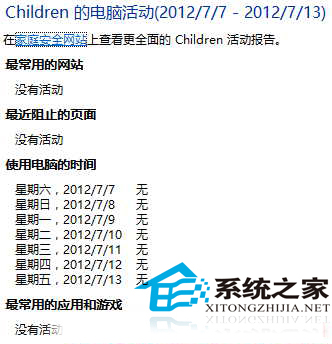
  4. 點擊「檢視活動報告」即時掌握孩子電腦使用詳情。
新增兒童帳戶啟用家庭安全
家庭安全主介面
兒童帳戶詳細設定
活動報告範例

全方位管控功能免費內建,有孩子的 Win8 家庭必開啟。

Copyright © Windows教程網 All Rights Reserved