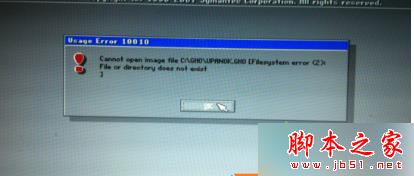
安裝 Win7 旗艦版後提示「can not open image file」(無法打開鏡像文件),原因多種:下載 GHO 鏡像損壞、路徑錯誤等。
建議:用 U 盤安裝 Win7,最好保留資料後重新分區安裝,盤符錯誤也會導致一鍵重裝找不到鏡像。
以上就是安裝 Win7 旗艦版提示「can not open image file」故障原因及解決方法。
Win10 提示「裝置驅動程式未安裝 代碼 28 無相容驅動」?驅動精靈/官網補裝缺失驅動
Win7/Win8.1 升級 Win10 後 Office 2013 文件無法開啟:修復安裝或執行 icacls 指令
Win7 螢幕保護程式設定:啟用、選擇、密碼保護與節電平衡
Win10 玩《黑暗靈魂 3》黑屏/閃退/無反應?三招修復:縮短路徑 + 管理員執行 + Win7 相容模式
[下載] Win10 TH2 正式版大量授權版 (VLSC) ISO 鏡像:專業版/企業版/教育版 簡繁英俄多語言
Windows 7 更新失敗解決方案:下載對應修補程式手動安裝
Win10 重置這台電腦:一招解決升級後各種 Bug(黑屏、閃退、卡頓),附保留檔案模式教學
Win8.1 微軟拼音輸入法隱藏中英切換懸浮按鈕,避免遮擋驗證碼