Windows XP Windows 7 Windows 2003 Windows Vista Windows 綜合教學 Linux 系統教學
Windows 10 Windows 8 Windows 2008 Windows NT Windows Server 電腦軟體教學
您现在的位置: Windows教程網 >> Windows教程 >  >> Windows 綜合教學 >> 關於 Windows

Win7桌面圖示全變Word圖示?刪除IconCache.db重建圖示快取即時恢復

編輯:關於 Windows

Win7桌面所有捷徑/執行檔圖示突然統一變成 Word/記事本/某個應用程式圖示,經典圖示快取損壞症狀。刪除 IconCache.db 並重啟 explorer.exe 即可秒級恢復。

快速修復步驟

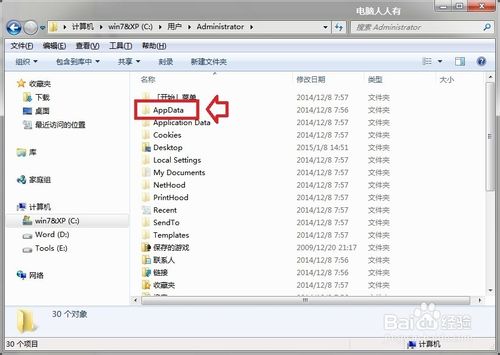
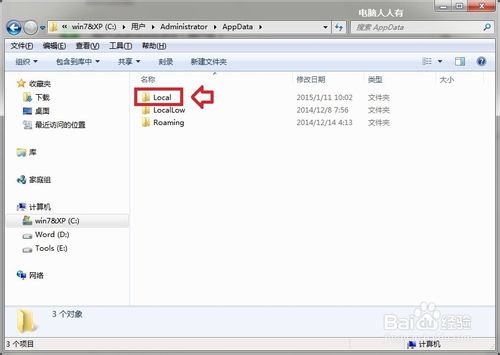
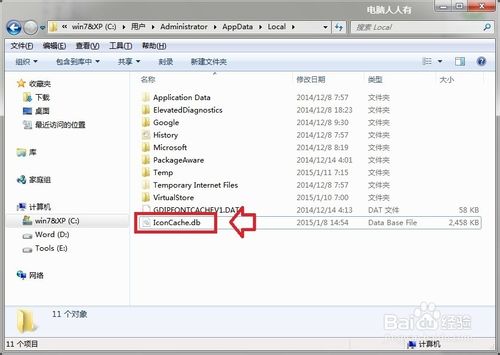
  1. 開啟檔案總管 → 定位至:
C:\Users\<你的用戶名>\AppData\Local\IconCache.db
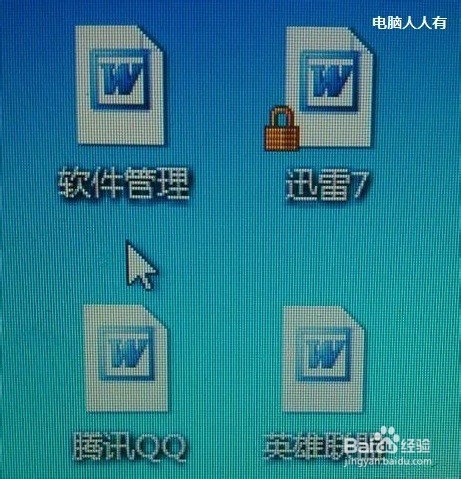
  1. 顯示隱藏檔案(檢視 → 勾選「隱藏的項目」)。
  2. 刪除 IconCache.db。
  3. 重啟檔案總管:任務管理員 → 找到「Windows 檔案總管」→ 右鍵「重新啟動」(或登出/重啟電腦)。

命令列一鍵修復(適合腳本/遠端)

taskkill /f /im explorer.exe
del /f /q %localappdata%\IconCache.db
start explorer.exe

原理說明

  • IconCache.db 為 Shell 圖示快取資料庫,儲存檔案副檔名→圖示索引映射。
  • 快取損壞(寫入中斷、磁碟錯誤、第三方主題修改工具衝突)導致映射錯誤,所有檔案指向同一錯誤圖示索引。
  • 刪除後 Shell 重新掃描註冊檔 HKEY_CLASSES_ROOT 重建映射,恢復正確圖示。

Win10/11 同樣適用

路徑相同:%localappdata%\IconCache.db。Win10 1709+ 另含 %localappdata%\Microsoft\Windows\Explorer\iconcache_*.db 多尺寸快取,建議一併刪除:

del /f /q %localappdata%\Microsoft\Windows\Explorer\iconcache_*.db

預防建議

  • 避免使用未簽名的第三方主題/圖示修改工具。
  • 磁碟健康監控(CrystalDiskInfo),壞軌導致快取寫入失敗是常見隱性原因。
  • 定期重啟 explorer.exe 或登出登入,釋放快取鎖定。

刪除一個檔案,恢復桌面視覺秩序,Win7/10/11 通用神技。

Copyright © Windows教程網 All Rights Reserved