Windows XP Windows 7 Windows 2003 Windows Vista Windows 綜合教學 Linux 系統教學
Windows 10 Windows 8 Windows 2008 Windows NT Windows Server 電腦軟體教學
您现在的位置: Windows教程網 >> Windows教程 >  >> Windows 綜合教學 >> 關於 Windows

Win7 清除多餘通知區域圖示:刪除登錄檔 IconStreams 與 PastIconsStreams 完整教學

編輯:關於 Windows

安裝軟體越多,通知區域(系統匣)殘留圖示越多,不僅佔用資源還影響美觀。透過編輯登錄檔移除 IconStreams 與 PastIconsStreams 兩個鍵值,並重啟 explorer.exe 即可徹底清除。

操作步驟

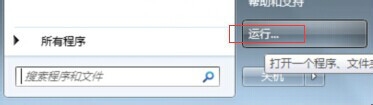
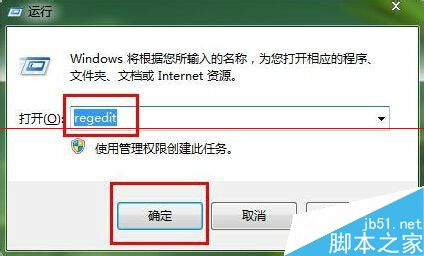
  1. 按 Win+R → 輸入 regedit 開啟登錄編輯器。
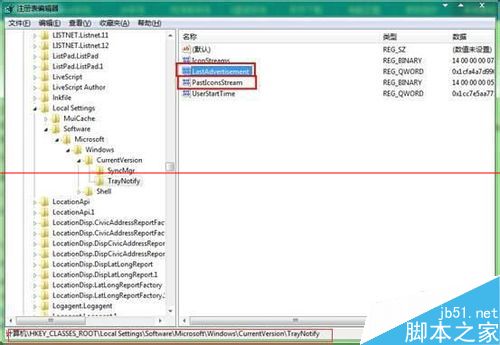
  2. 展開至:HKEY_CLASSES_ROOT\LocalSettings\Software\Microsoft\Windows\CurrentVersion\TrayNotify
  3. 右側窗格找到 IconStreams 與 PastIconsStreams 兩個值,**建議先右鍵匯出備份 TrayNotify 分支**,再刪除這兩個值。
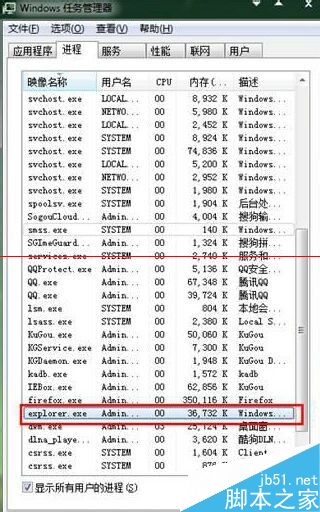
  4. 按 Ctrl+Alt+Del 開啟工作管理員 → 找到 explorer.exe → 右鍵「結束工作」。
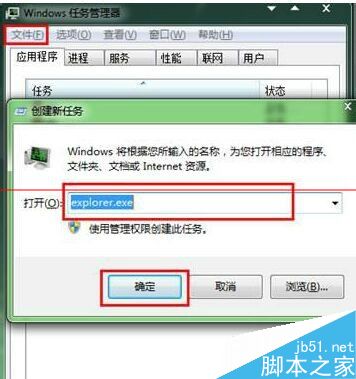
  5. 工作管理員 → 「檔案」→ 「執行新工作」→ 輸入 explorer → 確定,重啟總管進程。
開始選單
執行視窗
regedit
TrayNotify 鍵值
結束 explorer
重啟 explorer

後續維護

若未來再次出現多餘圖示,重複上述「結束 explorer.exe → 重啟 explorer.exe」即可快速清理,無需再動登錄檔。

Copyright © Windows教程網 All Rights Reserved