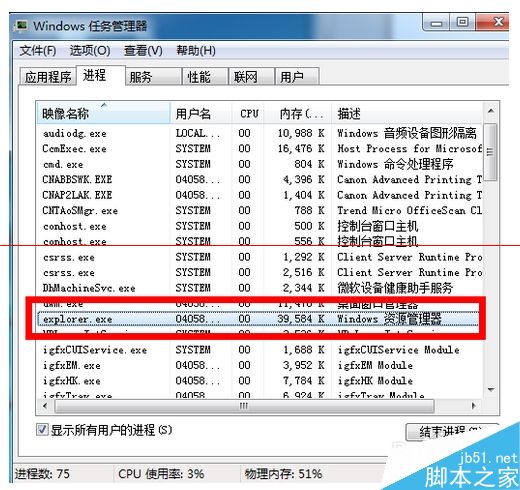
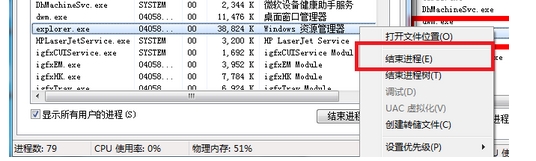
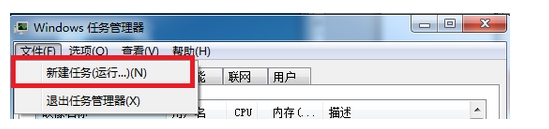
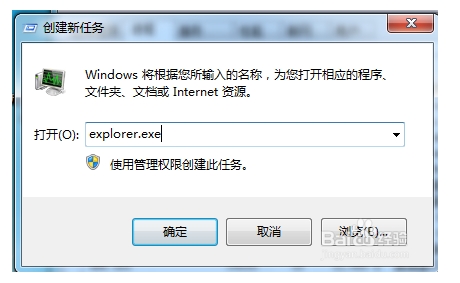
工作列運行程式圖示消失、剩空白區域,通常是 explorer.exe 異常。兩種修復方案:
explorer.exe
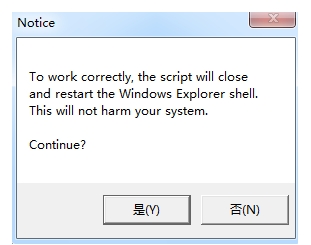
下載執行附件 VBS 檔,一路確定即可自動完成上述流程。
此症狀常因介面殼程式暫時卡死,重啟 explorer.exe 即可釋放資源並重建工作列快取。
Windows 8 強制啟用分割螢幕功能:登錄修改突破 1366x768 解析度限制
升級 Windows 10 的十大理由:效能、遊戲、新功能全面解析
Win8.1 連接隱藏 SSID 無線網路教學:手動輸入 SSID 與密碼
Windows 7 旗艦版(32/64 位、SP1)通用激活方法
Win8/8.1 使用 DISM 指令解壓 install.wim 映像檔完整教學
Win10 升级后如何删除升级包和旧系统文件释放空间?磁盘清理勾选“以前的 Windows 安装”
Win10 Mobile 紅石 14322 新功能:SIM 卡「僅用 3G/4G」+ 音訊路由/自動揚聲器切換
Win10 如何將「庫」添加到資源管理器默認打開位置?註冊表修改法