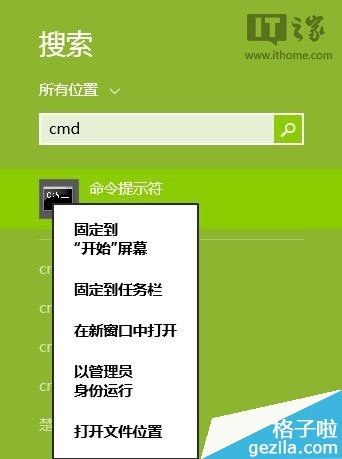
Win8.1 Update 安裝失敗顯示錯誤碼 80073712,可透過 DISM 工具修復系統映像:
80073712
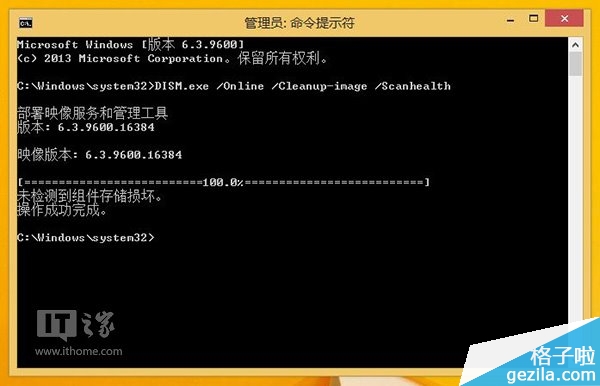
DISM.exe /Online /Cleanup-image /Scanhealth
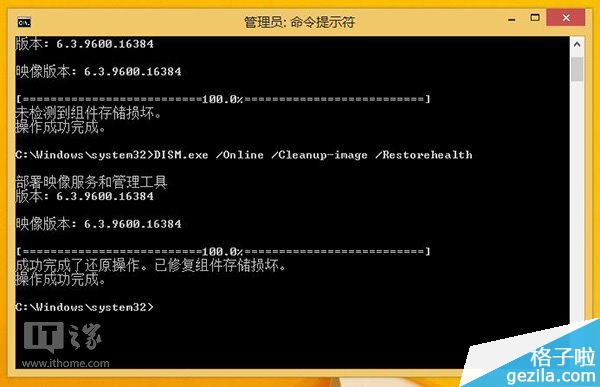
DISM.exe /Online /Cleanup-image /Restorehealth
註:修復涉及系統檔案驗證與磁碟讀寫,建議在電腦閒置時段操作。
Win7 停用主板內建音效晶片:BIOS 設定禁用 Onboard Audio 釋放資源
修改登錄檔恢復 Windows 8 傳統開始選單
Win10 Build 10135 多國語言 ISO 鏡像下載 (9 語言、三版本、僅 64 位元、無中文)
關閉 Windows 7 通知區「設定備份」提示:一鍵停用備份通知
Windows 7 自訂系統字體完整教學
Windows 修改 MAC 位址教學 突破區域網路 MAC 過濾限制
Win10 如何新增工具列?快速存取常用資料夾的實用技巧
Windows 10 USB 無線網卡無法使用?裝置管理員停用內建網卡讓指定網卡生效