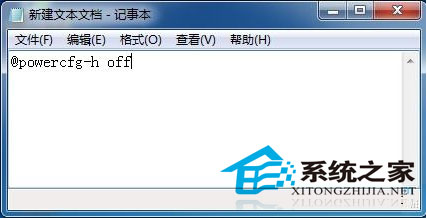
Win7 休眠模式雖好用,但每次開啟/關閉需多步驟。可建立批次檔實現一鍵操作:
@powercfg -h off
@powercfg -h on
.bat
將圖示置於桌面,即可輕鬆管理休眠功能。
Win10 預覽版安裝完整指南:ISO 鏡像四大玩法與多種安裝方法詳解
Windows 系統用 CMD 指令安裝與移除服務,兩種方法詳解
蘋果電腦安裝 Windows 7 調整預設字體大小 DPI 設定
Win10 Mobile/PC 如何使用隨機無線網卡 MAC 位址防止追蹤?硬體支援下一鍵開啟
Win10 Insider Preview 10532 內建「郵件」App 更新 回歸 Win8 早期「依對話排列」切換選項
Windows 10 家用版/專業版台灣售價出爐,盒裝版改用 USB 安裝
Win10 Build 10130 即將大規模推送給 Slow Ring 用戶
Win10 零售演示模式圖片與影片曝光:神秘「宋冬」帳戶現身