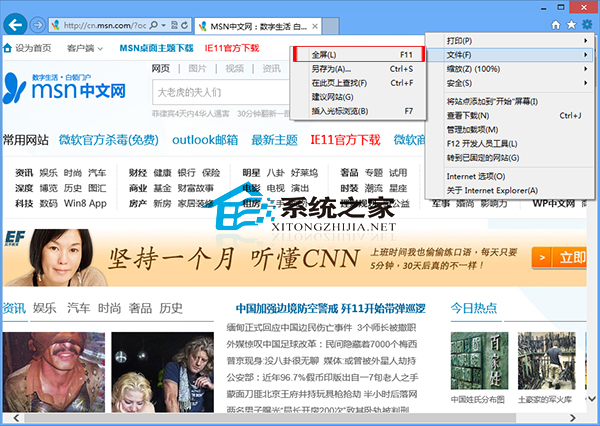
針對小螢幕裝置,Win8 內建 IE 瀏覽器支援全螢幕模式,操作有二法:
方法一:選單操作
方法二:快速鍵
直接按 F11 鍵即可切換全螢幕模式。
筆電用戶掌握此技巧可大幅提升螢幕空間利用率。
Win7 無法安裝軟件?註冊表清理 SQMClient DisabledSessions 修復安裝服務
Windows XP 如何設定經典關機介面?群組原則與 NetWare 用戶端兩法切換
Win8.1 Win+PrtSc 螢幕截圖不存檔僅存剪貼簿:重設使用者設定檔解決
Win10 Mobile 10572 值得升級嗎?上手體驗影片與新功能分析
Win10 提示「啟用 Windows 10,前往設定啟用」的原因與完整解決方案
Windows 10 正式版何時升級?各國當地 29 號 0 點開始推送,美東時間 28 日晚 9 點