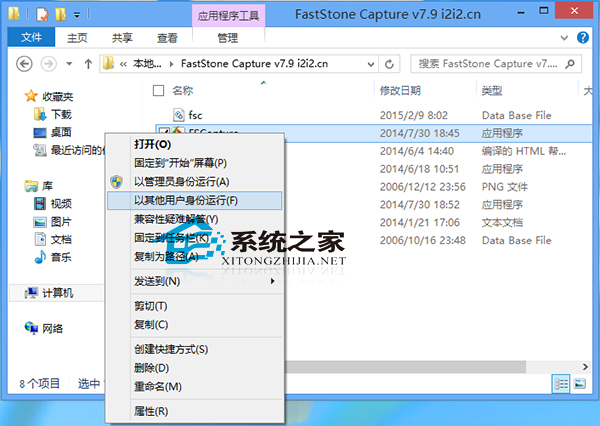
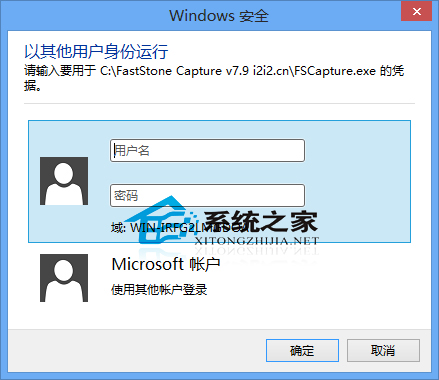
Windows 8 中若需以不同使用者身分執行程式(非系統管理員),只需在點擊程式圖示時按住 Shift 鍵再右鍵,右鍵選單即會顯示「以其他使用者身分執行」選項。
適用情境:系統存在多組使用者帳號,需以特定權限/環境執行程式時使用。管理帳號密碼設定仍需進入「使用者帳號」控制台項目。
Win10 電源選項找不到「休眠」?啟用隱藏的休眠選項加入開始功能表電源選單
Windows 8 完整快捷鍵大全:常用、進階、檔案總管、對話方塊、工作列、放大鏡、遠端桌面、畫圖、寫字板
Win10 Mobile 10586.242 提前體驗:穩定性提升、細節優化、已知 Bug 仍存
Win10 應用程式商店打不開/閃退?微軟官方修復工具一鍵自動修復
Win10 開始選單毛玻璃半透明效果怎麼關?登錄修改法
WinXP系統USB隨身碟檔案出現亂碼?完整排查與修復教學
Win7 C 槽空間不足?詳細可刪除檔案清單與釋放空間完整指南
Win7 IE瀏覽器網頁輸入框無法輸入文字?註冊表修復法