許多安裝 Windows 10 Build 10041 的用戶回報 Conexant(科勝訊)聲卡雖在裝置管理員顯示正常,卻完全無聲音輸出。經部分用戶實測,透過 msconfig 限制系統最大可用記憶體為 3072 MB 可暫時繞過此問題。
msconfig.exe 並按 Enter。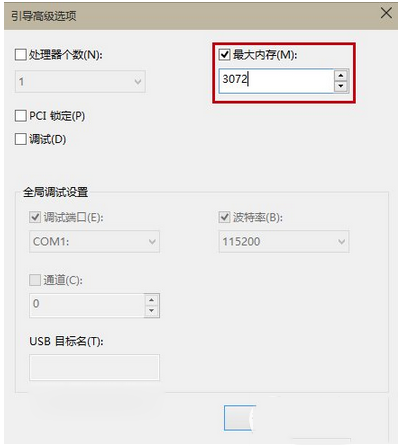
提醒:此為用戶社群發現的暫時性規避方案,微軟與 Conexant 仍在開發正式驅動修復。若您的裝置同屬此品牌聲卡,可嘗試上述方法。
Windows 7 內建磁碟管理:無損調整分區、建立新磁區完整圖解
Win10 Build 10532 已知問題彙總:Windows Hello 失效、64 位 Chrome 崩潰
Win10 正式版啟用暗黑主題技巧:使用 .theme 檔案快速套用 AllDarkEveV2 風格
Win10 Build 10049 開始推送:內建 Spartan 瀏覽器、修復 Bug、僅限快速通道、開發者勿升
Win7 如何徹底禁用「連按五次 Shift 啟用粘滯鍵」功能?
Windows 10 RTM 10240 64 位簡體中文家庭 OEM 版 ISO 下載(含校驗碼)