Windows XP Windows 7 Windows 2003 Windows Vista Windows 綜合教學 Linux 系統教學
Windows 10 Windows 8 Windows 2008 Windows NT Windows Server 電腦軟體教學
您现在的位置: Windows教程網 >> Windows教程 >  >> Windows 綜合教學 >> 關於 Windows

Windows 系統檔案損毀無法開機?用安裝媒體離線執行 sfc /scannow 修復

編輯:關於 Windows

當系統檔案受損導致無法進入 Windows,仍可透過安裝媒體 (ISO/USB/DVD) 進入 WinRE 環境,使用 sfc /scannow /offbootdir /offwindir 參數進行離線修復。本文完整記錄從開機媒體進入命令提示字元、確認磁碟代號、執行離線掃描、單一檔案修復的操作流程。

操作流程

  1. 插入 Windows 安裝媒體,設定 BIOS/UEFI 從媒體開機。
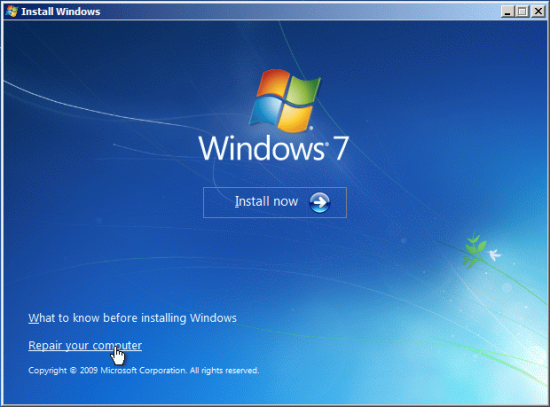
  2. 選擇語言 → 「修復您的電腦」→「疑難排解」→「進階選項」→「命令提示字元」。
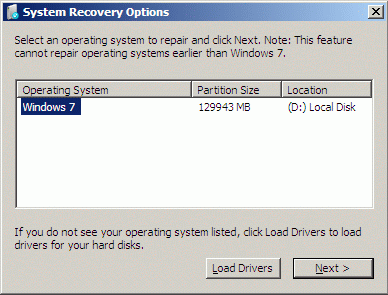
  3. 在命令提示字元輸入 diskpart → list volume 確認系統磁碟代號 (WinRE 下通常 C: 變 D:)。
  4. 執行離線掃描指令:
    sfc /scannow /offbootdir=D:\ /offwindir=D:\Windows
    (offbootdir 為系統分區,offwindir 為 Windows 目錄)
  5. 等待完成 (可能需數分鐘),重開機驗證。

選擇修復電腦
選擇系統磁碟
命令提示字元

單一檔案修復

若僅需修復特定檔案 (如 zipfldr.dll):

sfc /scanfile=D:\Windows\System32\zipfldr.dll /offbootdir=D:\ /offwindir=D:\Windows

注意事項

  • WinRE 環境下直接執行 sfc /scannow 會報錯「程序被占用」,必須加離線參數。
  • 磁碟代號請以 diskpart 實際查看為準,勿假設固定為 D:。
  • 若 sfc 無法修復,可嘗試 DISM /Image:D:\ /Cleanup-Image /RestoreHealth (需掛載 install.wim)。

Copyright © Windows教程網 All Rights Reserved