Windows XP Windows 7 Windows 2003 Windows Vista Windows 綜合教學 Linux 系統教學
Windows 10 Windows 8 Windows 2008 Windows NT Windows Server 電腦軟體教學
您现在的位置: Windows教程網 >> Windows教程 >  >> Windows 綜合教學 >> 關於 Windows

Win8 Metro 版 IE 跳轉至桌面版 IE 怎麼辦?設定桌面版 IE 為預設瀏覽器解決

編輯:關於 Windows

Win8 同時擁有 Metro 版 IE(現代介面)與桌面版 IE,若未正確設定預設瀏覽器,Metro 版 IE 開啟連結會自動跳轉至桌面版,造成體驗割裂。將桌面版 IE 設為預設瀏覽器即可修正。
設定步驟

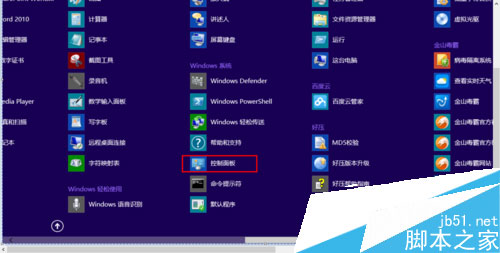
  1. 在 Metro 介面開啟 控制台。
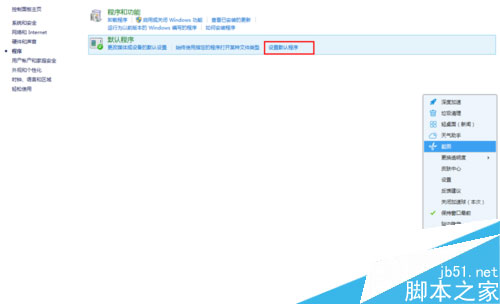
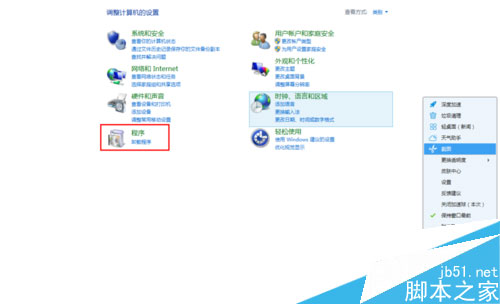
  2. 點選 程式 → 預設程式 → 設定預設程式。
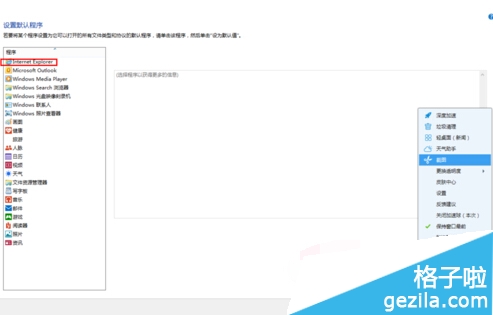
  3. 左側清單選擇 Internet Explorer。
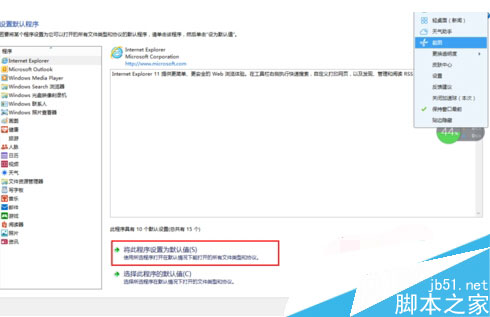
  4. 點擊 「將此程式設為預設值」,確定。
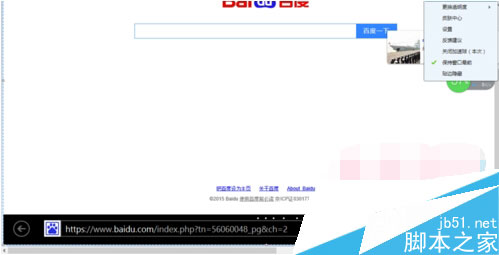
  5. 返回 Metro 版 IE 測試,連結將不再跳轉。

Metro 介面控制台

程式按鈕

設定預設程式

選擇 IE

設為預設值

Metro IE 正常開啟

原理說明

Win8 依據「預設瀏覽器」決定連結開啟目標。若預設為其他瀏覽器或未正確指定,Metro IE 會將導航委派給桌面版 IE。明確指定桌面版 IE 為預設,可統一處理邏輯。

延伸應用

  • 同樣方法可將 Chrome、Firefox 等設為預設,Metro IE 連結將在對應瀏覽器開啟。
  • 企業環境可透過群組原則 Computer Configuration\Administrative Templates\Windows Components\File Explorer\Set a default associations configuration file 批量部署。


Copyright © Windows教程網 All Rights Reserved