桌面放置大量圖示會導致顯示緩慢、點擊遲鈍、拖慢系統。透過登錄修改 Max Cached Icons 數值可輕鬆解決。
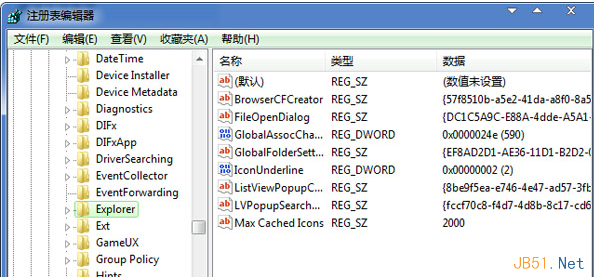
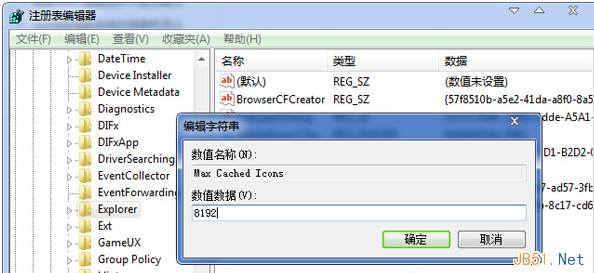
Max Cached Icons
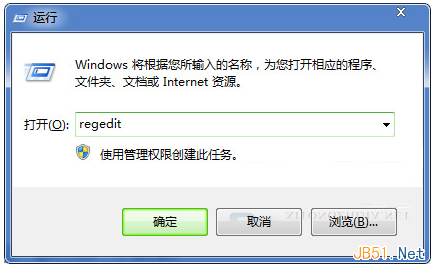
regedit
HKEY_LOCAL_MACHINE\SOFTWARE\Microsoft\Windows\CurrentVersion\Explorer
8192
修改後即使桌面圖示再多也能快速顯示,不再卡頓。建議定期整理桌面,利於系統效能與工作效率。
Windows 8 找不到開始資料夾?真實路徑與開啟方法
Win7/Win8 傳統 BIOS 模式安裝 SteamOS 完整圖文教學 (支援雙開機)
Win10 預覽版開機慢?四招優化啟動速度讓你告別 30 秒等待
Win8安全模式切換教程:msconfig 配置啟動選項圖解
Win10 提示「工作管理員已由系統管理員停用」怎麼辦?群組原則啟用教學
升級 Win10 後開機慢、黑屏久?關閉「快速啟動」並更新顯卡驅動雙管齊下
Win10 Mobile/PC 應用商店升級:詳細列出應用內購項目與價格清單
Win10 Mobile 預覽版 10586.11 洩露 修復重啟循環問題升級界面曝光