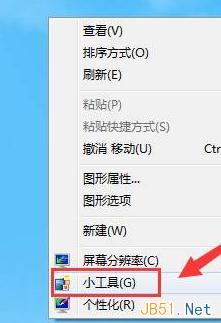
Windows 7 桌面新增行事曆小工具:
小工具列還有其他實用工具,同樣方式新增。
Win7 啟用/停用縮圖預覽:資料夾選項「一律顯示圖示,不顯示縮圖」設定
升級 Win10 後沒聲音?驅動更新、輸出裝置設定、服務重啟 3 大方向完整排除
Win10 更換主題圖文教程:個人化 → 主題 → 內建/商店下載/自訂主題全流程
Win10 正式版「設定」無法啟動?微軟官方疑難排解修復程式下載
Win8 常出現 DNS 解析錯誤?四大主因與對應解決方案完整分析
Win10 Build 10108 上手試玩截圖賞析:UI 融入深色主題、預設新增應用、修復為主
Windows 7 沒聲音?善用內建「疑難排解」自動診斷修復
Win7 查看帳號屬性報錯「工作站服務未啟動」解法:啟用 Server 與 Workstation 服務