Windows XP Windows 7 Windows 2003 Windows Vista Windows 綜合教學 Linux 系統教學
Windows 10 Windows 8 Windows 2008 Windows NT Windows Server 電腦軟體教學
您现在的位置: Windows教程網 >> Windows教程 >  >> Windows 綜合教學 >> 關於 Windows

Win7 開啟 Windows PowerShell 兩大法:開始搜尋法與附屬應用程式法

編輯:關於 Windows

Windows PowerShell 是強大的自動化指令列殼層與腳本語言,Win7 內建 2.0 版本。平時隱藏於開始選單深處,提供兩種快速開啟方式 (均可以系統管理員身分執行)。

方法一:開始搜尋法 (最快)

  1. 點選「開始」→ 搜尋框輸入 PowerShell。
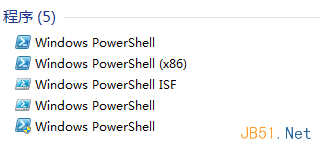
  2. 搜尋結果出現 Windows PowerShell,右鍵 → 選擇 「以系統管理員身分執行」。

方法二:附屬應用程式法 (傳統路徑)

  1. 「開始」→「所有程式」→「附屬應用程式」。
  2. 找到 Windows PowerShell 資料夾 → 展開 → 右鍵 Windows PowerShell → 「以系統管理員身分執行」。

開始搜尋 PowerShell 以管理員身分執行

補充資訊

  • PowerShell 版本查詢:開啟後輸入 $PSVersionTable.PSVersion,Win7 預設 2.0,可升級至 5.1 (WMF 5.1)。
  • ISE 整合腳本環境:同資料夾有 Windows PowerShell ISE,提供圖形化腳本編輯、除錯、IntelliSense,適合撰寫複雜腳本。
  • Win10/11 開啟方式:Win+X → 選擇「Windows PowerShell (系統管理員)」或「終端機 (系統管理員)」。
Copyright © Windows教程網 All Rights Reserved