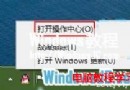
免費升級 Windows 10 需具備合法授權的 Win7/8.1。授權類型分三種:Retail (零售版)、OEM (預裝版)、Volume (大量授權)。前兩者符合免費升級資格,大量授權需透過企業合約管道。以下兩種快速查詢方法。
slmgr.vbs /dlvRETAIL (零售版) / OEM (預裝版) / VOLUME (大量授權)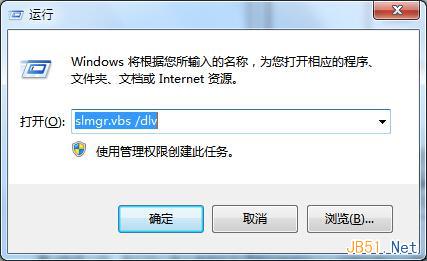
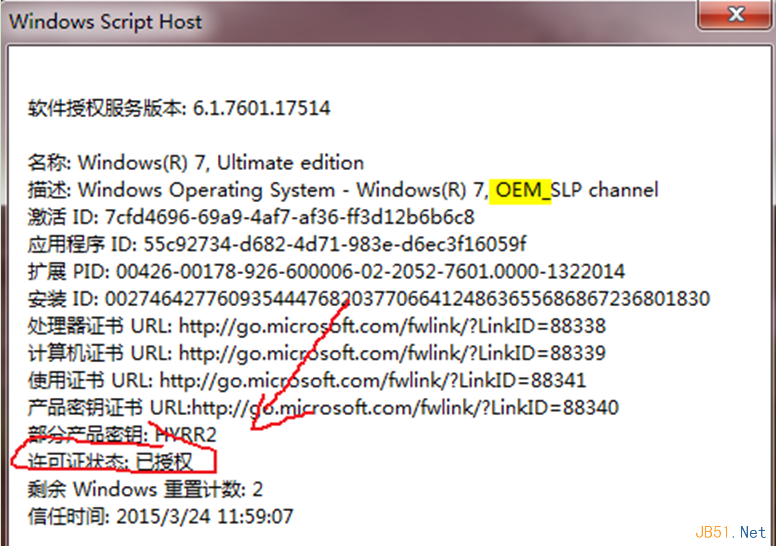
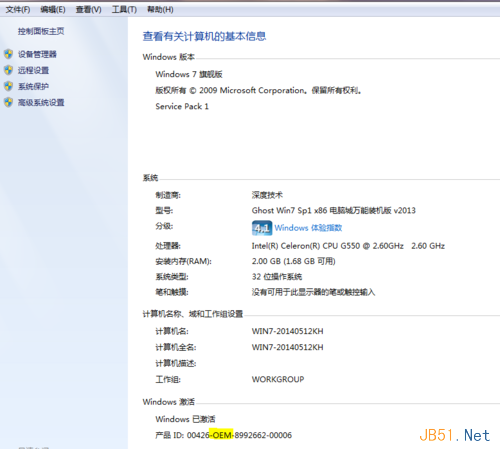
| 授權類型 | 免費升級 Win10 | 備註 |
|---|---|---|
| Retail (零售版) | ✅ 是 | 可轉移授權至新硬體 |
| OEM (預裝版) | ✅ 是 | 綁定主機板,不可轉移 |
| Volume (大量授權) | ❌ 否 | 需企業合約 (SA/EA) 管道升級 |
免費升級優惠已於 2016 年 7 月 29 日結束。目前升級 Win10 需購買授權。文中方法仍適用於查詢現有系統授權狀態、疑難排解啟動問題。
Win10 RTM 升級 C 槽空間不足解決方案:支援 USB/外接硬碟暫存
Win7 搜尋找不到檔案?善用萬用字元「*」查找檔名中間關鍵字
Windows Server 2003 新增/移除程式與 Windows 元件完整操作指南
Windows 10 筆電搜尋不到 Wi-Fi 熱點?診斷啟動 WLAN AutoConfig 服務秒解決
Win10 禁止 IE11 自動更新安裝新版本:關於 IE 介面取消勾選「自動安裝新版本」
Win10 畫圖工具轉換圖片格式:無需第三方軟體,另存為即時轉 JPG/PNG/BMP/GIF/TIFF