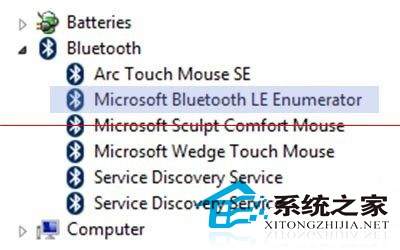
並非所有內建藍牙的電腦都支援藍牙 4.0 (Bluetooth Low Energy, BLE)。Windows 8 可透過裝置管理員快速確認:若列表中出現 Microsoft Bluetooth LE Enumerator 即代表支援藍牙 4.0,可正常連接 BLE 周邊(智慧手環、藍牙鍵盤/滑鼠、感測器等)。
檢測步驟
- 在「開始」畫面輸入「裝置管理員」或按 Win + X 選「裝置管理員」。
- 展開 「藍牙」 分類(若無此分類代表無內建藍牙或驅動未裝)。
- 查看裝置清單中是否有 Microsoft Bluetooth LE Enumerator。
- 若有 → 支援藍牙 4.0 (BLE);若無 → 僅支援藍牙 3.0/2.1 或更舊版本。
補充說明
- 藍牙 4.0 相容藍牙 3.0/2.1 裝置,但 3.0 裝置無法使用 BLE 低功耗特性。
- 市售多數 USB 藍牙接收器已支援 4.0,購買前確認規格表標示「Bluetooth 4.0」「BLE」「Low Energy」。
- 若裝置管理員無「藍牙」分類,請先安裝廠商原廠藍牙驅動程式。