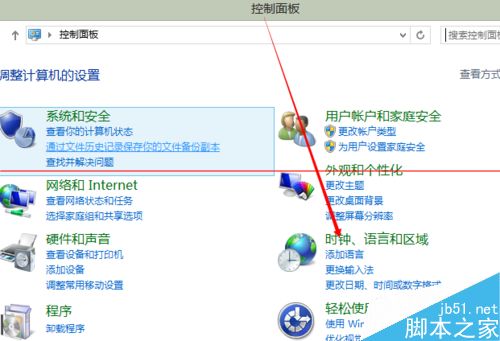
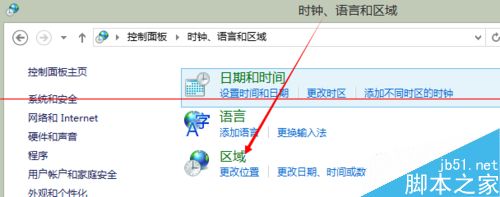
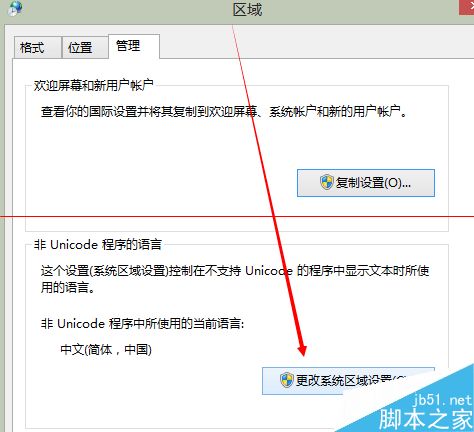
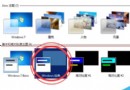
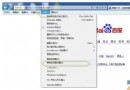
Windows 8 系統安裝股票交易軟體或特定文字應用時出現介面亂碼,主因為系統地區設定非「繁體中文」。調整地區格式即可修正。
注意: 變更地區設定需重新開機才會生效。此設定影響系統預設日期、時間、貨幣、數字格式,亦決定非 Unicode 程式的字碼頁解碼方式,故能解決舊版中文軟體亂碼問題。
Win10 內建中文輸入法卡頓解決:關閉雲端運算與個人化設定
Win10 Edge 瀏覽器頻繁閃退?重設預設瀏覽器或重註冊 App 包解決
Win10 一直顯示「正在鎖定」轉圈圈?關閉睡眠/平板模式/系統保護排查
Windows 10 累積更新 KB3081424 安裝失敗 (0x80070003)?嘗試安裝 KB3081440 相容性更新可望修復
Win8 筆電關閉內顯強制使用外接獨顯:BIOS 與控制面板雙法
Win10 玩 DNF 频繁閃退怎麼辦?四大解決方案從相容性到系統還原
升級 Win10 後騰訊視訊卡頓、無回應?兩大解決方案修復播放異常
Win10 禁止驅動程式自動更新:群組原則關閉 Windows Update 驅動搜尋