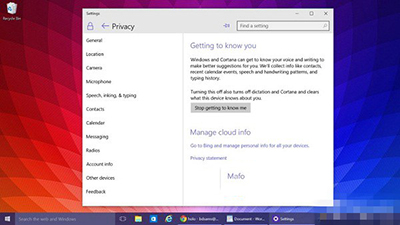
Win10 小娜助手會收集使用者語音、手寫、輸入習慣以提供個人化服務。若重視隱私可停用:
簡單幾步驟即可在智慧助理與隱私保護間取得平衡。
Windows 7 修改註冊表提高應用程式回應速度:設定 WaitToKillAppTimeout 為 0
Win8 如何設定擴充顯示?Win+P 快速切換投影模式教學
Win10 關閉 Cortana Web 搜尋加快回應速度:群組原則禁用線上搜尋
Win10 群組原則開啟報「命名空間已被定義」錯誤?刪除 Geolocation WLPAdm.admx 徹底解決
微軟釋出 Windows 10 技術預覽版官方英文使用者指南(PDF 下載)
Win7 螢幕亮度調整兩大法:電源選項滑桿與 Win+X 快捷選單
Win7 旗艦版激活工具「小馬 Oem7F7」使用圖文教學
Win10 更新報錯 0x8024402f 解決法:重置更新服務與相關 DLL 註冊 (微軟社區官方方案)