Win10 搜尋列整合 Cortana,預設會同時搜尋本機與網路,網速慢時明顯延遲。專業版可用群組原則徹底禁用 Web 搜尋,讓搜尋瞬間回應。
gpedit.msc 開啟群組原則編輯器。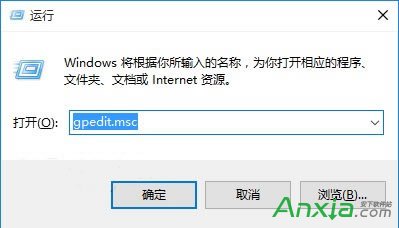
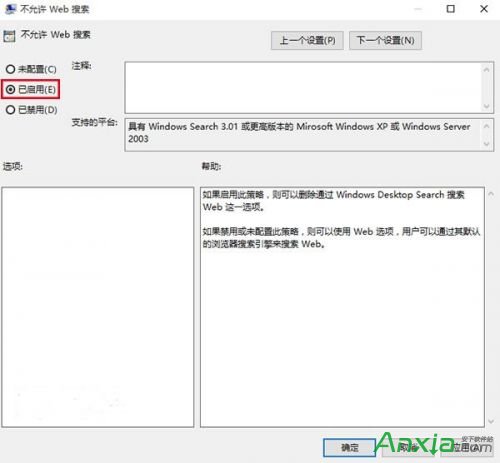
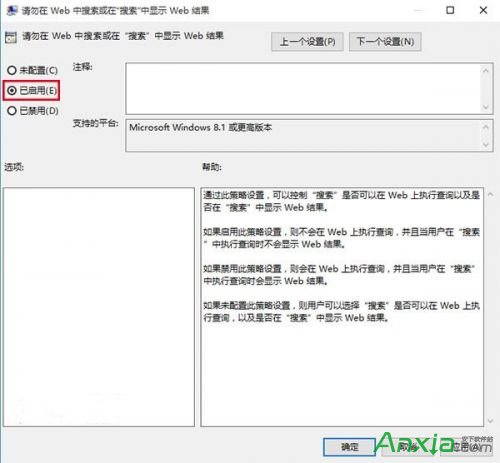
HKCU\SOFTWARE\Microsoft\Windows\CurrentVersion\Search\BingSearchEnabled=0。Win10 10565 预览版新功能上手视频:Cortana 手写识别、交互式通知、Skype 集成、标题栏配色
Win8.1 系統怎麼查看硬盤大小?Win8.1 查看硬盤容量的方法
WinXP 收藏夾無法顯示網址?修復登錄 User Shell Folders 中 Favorites 路徑即可
Windows 10 Mobile Build 10149 多圖賞析:Edge 瀏覽器、手電筒、動態磚塊優化
Windows 10 登錄檔編輯器被鎖定?群組原則一鍵解鎖教學
微軟為何不預告下一個 Win10 Mobile/PC 預覽版推送時間?開發流程無固定排程