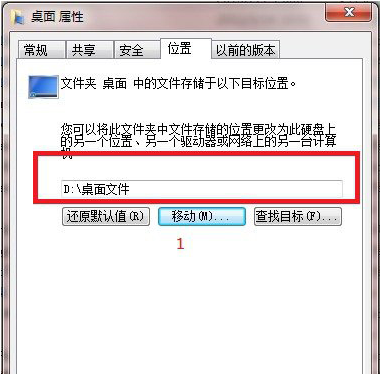
透過桌面資料夾屬性中的「位置」頁籤,將桌面路徑遷移至其他分區,避免系統崩潰導致桌面檔案遺失。
C:\Users\<用戶名>
Win8.1 彈出 Windows 更新提示「Windows 升級已可供安裝」怎麼辦?
Win10 家庭版用戶可能被迫強制安裝系統更新,無法延遲
Windows 7 移除桌面圖示虛線框:效能選項設定教學
Win7 音訊服務未執行導致無聲音?啟動 Windows Audio 服務或更新聲卡驅動雙管齊下
Windows 7 螢幕亮度調整:電源選項與 Win+X 快捷鍵雙管齊下
如何從微軟官網下載 Win10 預覽版簡體中文版?
Windows 10 Build 9879 技術預覽版釋出:核心大幅改進、新動畫、手勢支援
多重開機已裝 Win10 卻仍被推廣升級?六種關閉 Win10 推送提示方法總整理