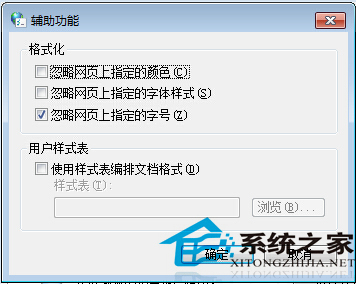
瀏覽不同網頁時字型大小不一,眼睛難適應。IE 內建功能可強制忽略網頁指定字號,統一顯示大小,適用所有 IE 核心瀏覽器。
設定後所有 IE 核心瀏覽器網頁字型將依系統預設大小統一顯示,閱讀體驗一致。
Win10 Mobile 10581 更新內容完整彙總:Bug 修復、效能提升、Hey Cortana 恢復、社交應用發圖修復
Win10 安裝軟體導致藍屏無法進安全模式?用老毛桃 PE 還原 SYSTEM 檔案搶救系統
Win10 筆電連接小米藍牙音箱/Link 線雙模教學:藍牙配對與 3.5mm 有線直連
關於 Windows 10 所有問題解答彙總:免費升級、版本、Cortana、Edge、相容性一次看懂
Win10 預覽版任何版本均可升級正式版,無需舊版序號
Windows 8 使用 Windows To Go 製作隨身作業系統完整教學
Win10 徹底關閉「快速存取」功能:註冊表修改 Attributes 值隱藏導覽窗格項目
Win10 登錄備份與還原完整教學,修改前必備技能