Win7 隱藏資料夾只需兩步驟,配合「不顯示隱藏檔案」設定,一般使用者無法發現。
隱藏步驟
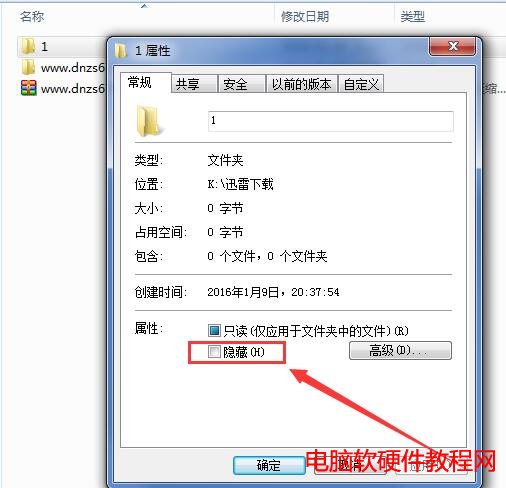
- 資料夾右鍵 → 「內容」→「一般」頁籤 → 勾選 「隱藏」 → 「套用」。
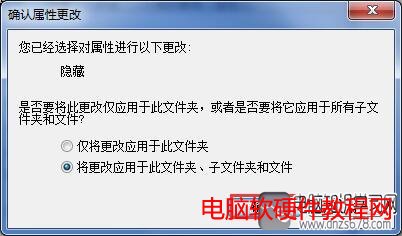
- 若為資料夾含子項目:彈出「確認屬性變更」 → 選 「將變更套用至這個資料夾、子資料夾和檔案」 → 確定。
配合系統設定徹底隱形
- 控制台 → 「資料夾選項」→「檢視」頁籤 → 選 「不顯示隱藏的檔案、資料夾或磁碟機」 → 確定。
此法屬「軟隱藏」,懂行者可透過「顯示隱藏檔案」或 CMD dir /a 看到。機密資料建議加密 (EFS/BitLocker) 或壓縮加密 (7-Zip/WinRAR 加密) 存放,隱藏僅防君子不防小人。