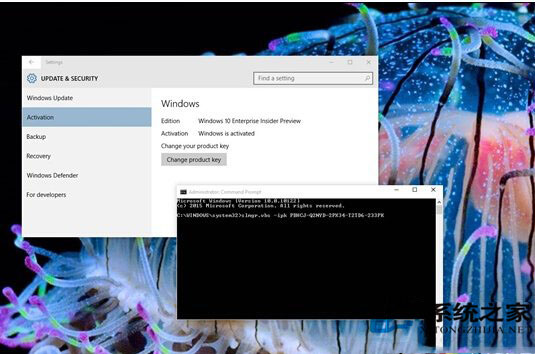
Windows 10 Build 10122 升級後出現無法啟動情況,可透過命令提示字元(系統管理員)輸入 GVLK 批量授權金鑰解決:
slmgr.vbs -ipk PBHCJ-Q2NYD-2PX34-T2TD6-233PK
此為 Windows 10 Technical Preview 通用啟動金鑰 (GVLK),適用於預覽版啟動。正式版釋出後將需正式授權。預覽版屬測試性質,穩定度與相容性仍有提升空間,遇到問題屬正常現象。
Win10 Build 10049 官方鏡像下載地址:僅限快速通道線上更新、暫無 ISO、開發者勿升級
Win7 如何重灌系統?硬碟安裝法 (非 USB/光碟) 菜鳥級圖文教學,15 分鐘完成
Windows 7 安裝常見錯誤代碼與解決方案完整指南
Win7 IE 瀏覽器提示「已經遇到加載項故障並且需要關閉」?安裝 IE 累積補丁修復漏洞
Win10 TH2 正式版升級完整操作指南:從檢查更新到激活驗證全流程實錄
Windows 10 Build 9931/9932 預覽版現身更新通道,快慢速通道差異解析
Windows 10 步驟記錄器是什麼?錄製操作步驟教學(含圖文與幻燈片模式)
Win 10 應用程式商店重裝修復完整教學:DISM 掃描修復 + PowerShell 重新註冊