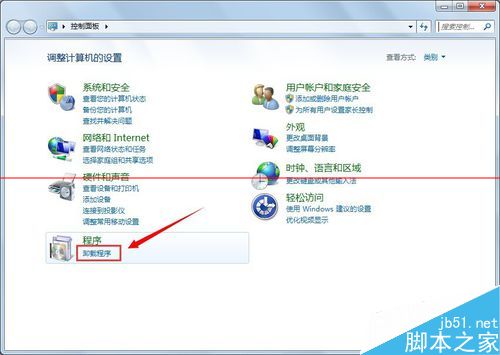
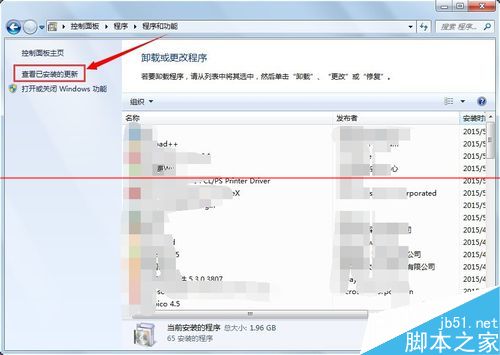
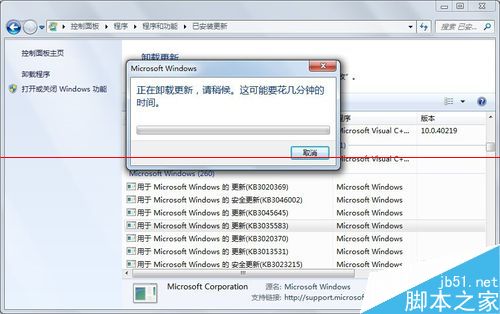
微軟推送 Win10 升級提示,工作列右下角圖示無法關閉。移除方法:
注意:未來 Windows Update 可能再次推送 KB3035583,忽略即可。
相關推薦:微軟官方版封鎖 Win10 升級通知圖示技巧。
Win7 64位元攝影機驅動黃色驚嘆號無法使用?刪除登錄 UpperFilters 值修復
Win10 裝機必備 5 大軟體推薦:Office、殺毒、PDF 閱讀器、通訊、瀏覽器
Win7 旗艦版是否為 SP1 版本?電腦屬性一眼看穿
Win8 相機功能在哪?從開始畫面與應用清單雙管道啟動
Win8 筆電喇叭爆音/破音解決:停用 Multimedia Class Scheduler 服務
Win7 IE 管理增益集:停用/移除工具列、ActiveX、瀏覽器助手物件 (BHO)
Win10 多重桌面(虛擬桌面)使用教學:Task View 一鍵新增/切換/移動視窗
Win10 開機黑屏 30 秒才進系統?核顯/獨顯驅動衝突完美解決方案