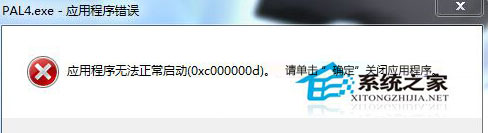
Win7 玩遊戲彈出「應用程式無法啟動 0xc00000d」解決方案:
依序執行通常能解決 0xc00000d 問題,遊戲玩家必備排除步驟。
Win7/8.1/10 UAC「是」按鈕灰色無法點擊?將目前帳號加入 Administrators 群組解決
Win8 開啟「資料夾選項」設定檔案顯示與開啟行為
Win8.1 升級 Win10 出現 modern setup host 停止運作?四大解決方案
Win7 防火牆還原預設設定,一鍵解決誤設導致的網路異常
Win10 Mobile 週年更新正式版 14393.67 首波推送解鎖/無鎖裝置,營運商版延後
Win10 SDK Build 10158 釋出:新增感知裝置、進階照片捕捉、照片匯入 API
Win7 快速辨別 USB 3.0/2.0 介面:針腳數量與裝置管理員雙重驗證
Win10 快速鍵補充:視窗貼齊、工作檢視、虛擬桌面、開始選單鍵盤導航