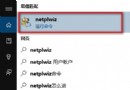
Win10 預設白底視窗久看傷眼,可透過登錄檔修改預設視窗背景色:
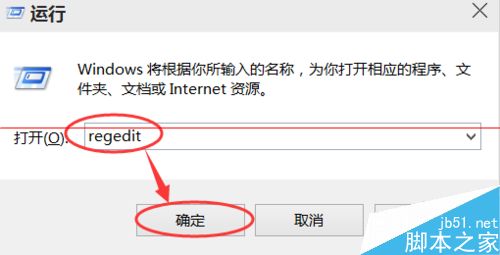
regedit。HKEY_CURRENT_USER\Control Panel\Colors。Window → 數值資料從 255 255 255 (白) 改為 204 232 207 (淡綠護眼色)。
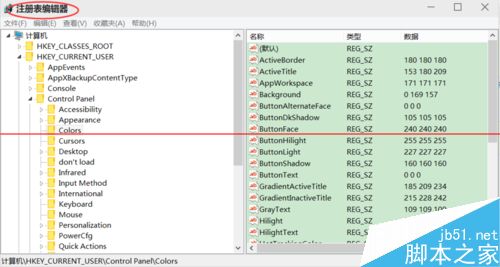
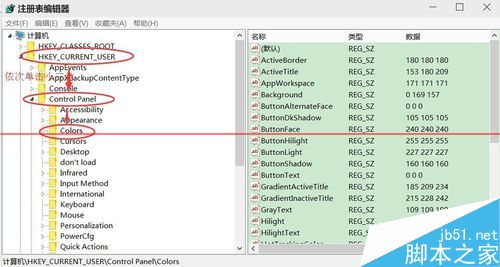
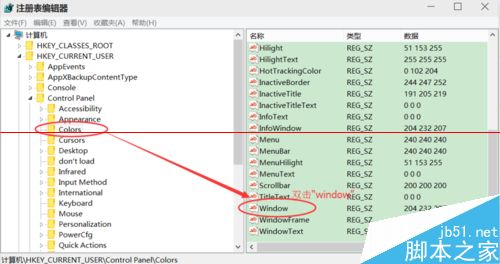
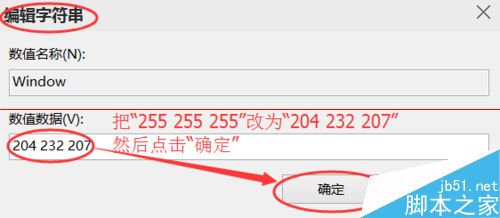
數值格式為「R G B」,可自行調整喜好顏色。修改前建議匯出登錄檔備份。
Windows 7 工作列客製化:顯示標籤、小圖示、不合併,找回 XP 經典手感
Win7 程式庫無法加入網路資料夾?必須滿足三大前提條件:聯網、存密碼、啟用離線檔案
Win10 系統映像備份完整教學:控制台建立還原點,預覽版必備技能
Windows Server 2008 DNS 伺服器安裝與區域建立完整圖文:正向查詢、A 記錄、測試驗證
Win10 程序經常無響應怎麼辦?PowerShell 重註冊內置應用修復
Windows 10 未插 USB 裝置卻顯示「安全移除硬體」圖示的兩種修復方法
Win7 內建繪圖工具提示「已停止運作」?DISM 與 SFC 修復系統檔案
Win10 升级报错找不到 boot.wim (0x80070002)?复制 $Windows.~BT 到非系统盘运行 Setup.exe 修复