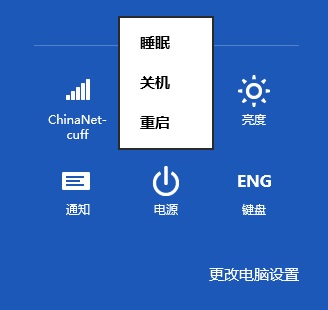
Win8 移除開始功能表,關機鈕隱藏較深。標準與進階關機法:
shutdown -s -t 0
熟悉新操作模式,關機其實不複雜。
Windows Server 2003 內建郵件服務器(POP3/SMTP)部署教學
Windows 7 新增印表機連接埠 (Standard TCP/IP Port) 共享列印伺服器設定教學
百度 Win10 直通車相容性不正常解決方法與常見問題彙總
Win7 顯示檔案副檔名(擴展名)完整教學:資料夾選項一鍵開啟
Windows 10 Mobile Build 10134 影片評測:流暢度大幅提升、VPN 可用、相簿磚自訂圖片
Win10 周年更新 Windows Hello 生物識別全解析:臉部/指紋/配對裝置免密登入
Windows 10 內建「照片」App 修圖完整教學:裁剪、濾鏡、光線色彩調整、去瑕疵/紅眼
Win10 開啟資料夾閃退怎麼辦?解除安裝最近更新並重開機即可修復