Windows XP Windows 7 Windows 2003 Windows Vista Windows 綜合教學 Linux 系統教學
Windows 10 Windows 8 Windows 2008 Windows NT Windows Server 電腦軟體教學
您现在的位置: Windows教程網 >> Windows教程 >  >> Windows 綜合教學 >> 關於 Windows

Win10 工作列搜尋框佔空間太大?右鍵工作列三秒關閉或只保留圖示

編輯:關於 Windows

Windows 10 工作列預設顯示大型搜尋框,佔據空間且易誤觸,右鍵工作列即可快速調整顯示模式。

調整步驟

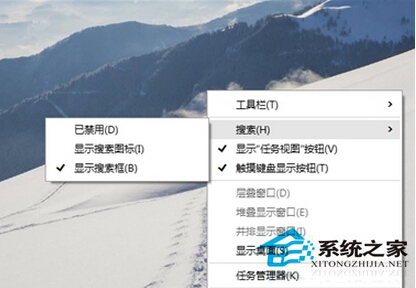
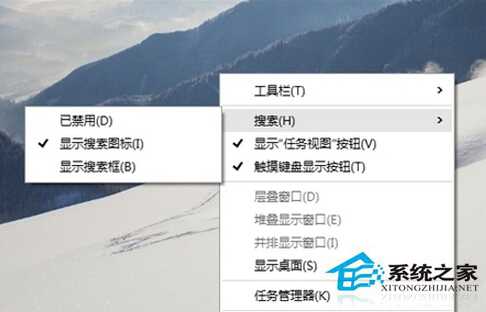
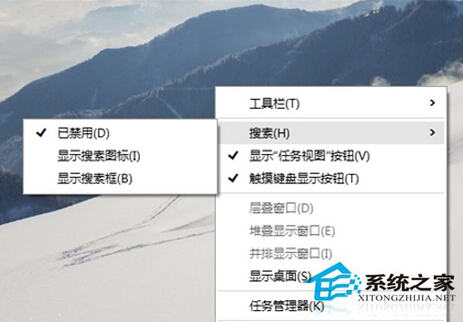
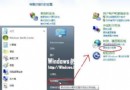
  1. 工作列空白處右鍵 → 游標指向「搜尋」。
  2. 三種模式任選:
  • 隱藏:完全關閉搜尋框與圖示。
  • 顯示搜尋圖示:僅保留放大鏡圖示,點擊喚出 Cortana/搜尋面板。
  • 顯示搜尋方塊:預設完整搜尋框。

完整搜尋框

僅顯示圖示

完全隱藏

同理可調整

  • 工作列右鍵 →「顯示工作檢視按鈕」(多工作業/虛擬桌面圖示)。
  • 工作列右鍵 →「顯示觸控鍵盤按鈕」(右下角觸控鍵盤圖示)。
Windows 10 仍在預覽版持續優化中,更多隱藏功能待發現。調整後即時生效,無需重開機。

Copyright © Windows教程網 All Rights Reserved