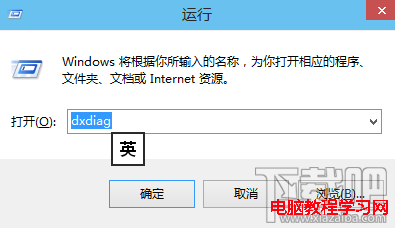
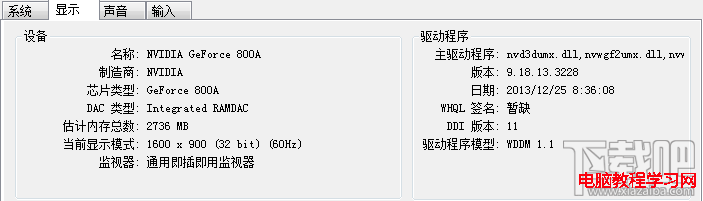
Win10 內建工具即可查顯卡規格,無需額外軟體:
dxdiag
需更詳細資訊(GPU 頻率、穩定性測試等)可用 魯大師、AIDA64 (專業版)。
內建工具夠用,發燒友可加裝專業軟體深度檢測。
無本機群組原則的 Win8 如何徹底移除 OneDrive?命令列一鍵停用同步
Win10 開啟命令提示字元(CMD)的多種技巧與管理員模式啟動法
Windows 7 加裝記憶體容量未增加?關閉「最大記憶體」限制解決
Win10 使用者資料夾暴增幾十 GB?顯示隱藏檔案逐層排查大型快取/暫存/錯誤報告
Win10 10547 經典「個性化」視窗回歸:主題設定入口藏在設定App深處
Win8/8.1 寬帶連線錯誤 629 完整排查指南:從帳號到光猫重啟
Windows 7 刪除不需字體釋放資源:字型資料夾手動清理指南
Windows 10 安裝輸入法教學:以搜狗輸入法為例,下載安裝切換設定全流程