Windows XP Windows 7 Windows 2003 Windows Vista Windows 綜合教學 Linux 系統教學
Windows 10 Windows 8 Windows 2008 Windows NT Windows Server 電腦軟體教學
您现在的位置: Windows教程網 >> Windows教程 >  >> Windows 綜合教學 >> 關於 Windows

Win10 無線網卡 RTL8192DE 無法使用?改用 Atheros 驅動即可解決

編輯:關於 Windows

不少用戶裝 Win10 預覽版後發現 RTL8192DE 無線網卡失效。解決方法:在裝置管理員將該裝置驅動更新為「Qualcomm Atheros AR9285 Wireless Network Adapter」而非原廠 Realtek 驅動。

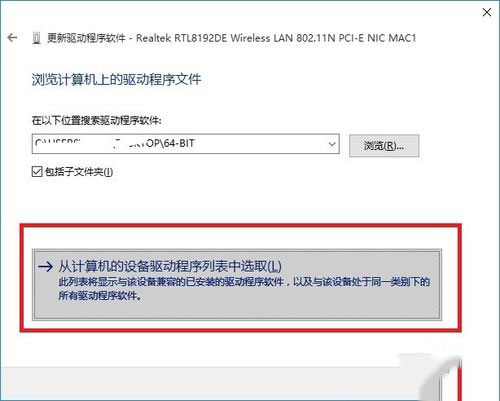
  1. 右鍵 Realtek RTL8192DE →「更新驅動程式」→「瀏覽電腦尋找驅動程式」。
  2. 選「從電腦裝置驅動程式清單選擇」。
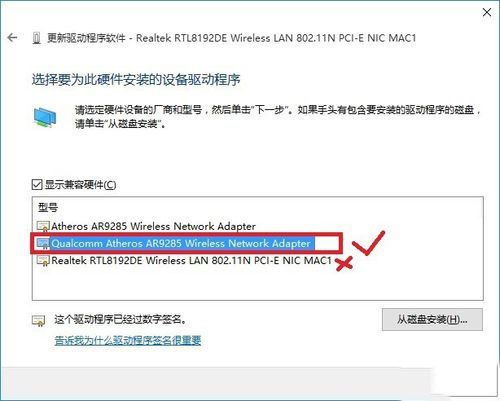
  3. 選第二項 Qualcomm Atheros AR9285 Wireless Network Adapter,非第三項 Realtek。
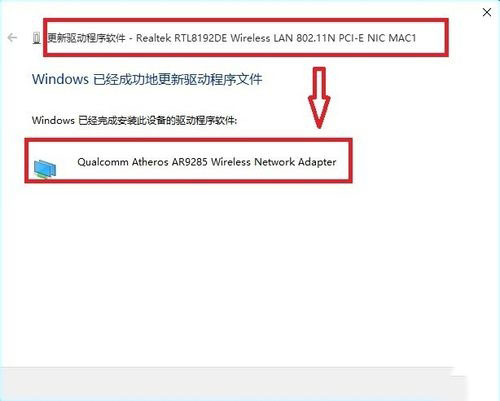
  4. 快速更新後網卡成功啟用,圖示驚嘆號消失。

Copyright © Windows教程網 All Rights Reserved