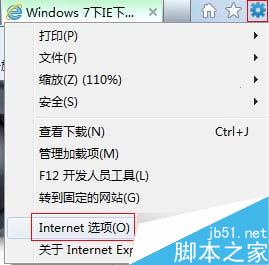
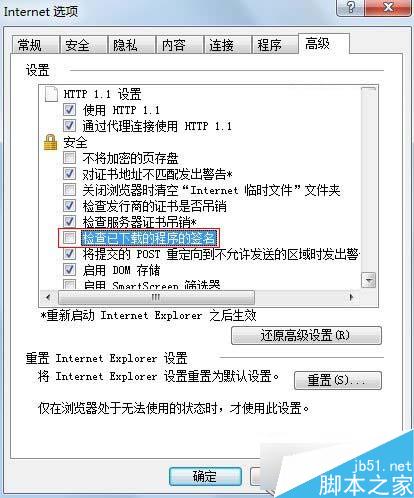
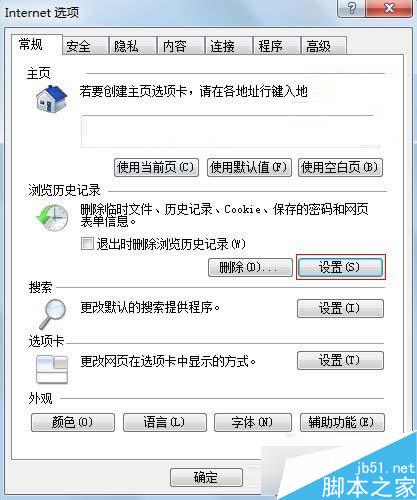
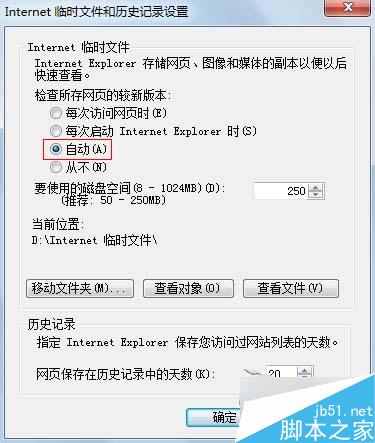
Win7 IE 下載卡在 99% 解決方法:
調整後可避免簽章驗證卡住下載流程。
Win10 RedStone 預覽版 14267 該怎麼更新升級?
Win10 Cortana 搜尋結果顯示緩慢?教你幾招輕鬆解決索引問題
常用 Windows 執行指令 (Run Commands) 完整速查表
解決電腦工作列變寬、無法復原的問題
Windows 7 / XP 設定自動登入,開機直達桌面免輸入密碼
Win8 用戶明年 1 月可透過 Windows Update 升級 Win10 技術預覽版:微軟釋出準備工具降低安裝門檻
Win7 關閉安全警示(防火牆/安全中心)完整圖文教學
Win10 安裝軟體導致藍屏無法進安全模式?用老毛桃 PE 還原 SYSTEM 檔案搶救系統