新手常因誤操作導致工作列變寬佔據螢幕空間。透過解除鎖定、移除工具列、拖曳邊緣即可快速恢復預設寬度。
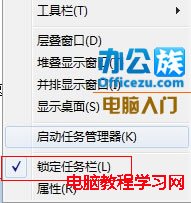
1、關閉所有程式 → 右鍵工作列 → 取消勾選「鎖定工作列」。
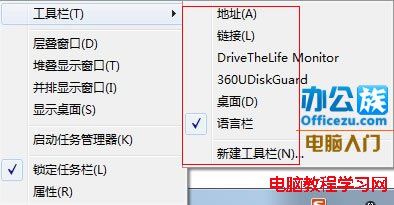
2、右鍵工作列 →「工具列」→ 取消所有勾選項目。
3、滑鼠移至工作列上緣變成雙向箭頭 → 按住左鍵向下拖曳至適當寬度。
Win7 螢幕閃一下變黑再亮?三大可能原因:顯卡驅動、顯示晶片、螢幕硬體故障排查
64 位元 Win7 旗艦版右下角音量小喇叭圖示消失?兩大方法找回:工作列屬性設定、重啟 Explorer
Win10 字體模糊發虛怎麼辦?自訂縮放設為 100% 徹底解決顯示異常
Win10 內建新版「照片」應用調整陰影效果,拯救背光/高反差照片
Windows 10 10074 啟用暗黑模式:登錄檔新增 SystemUsesLightTheme = 0 即可切換
Win 10 線上推送引發全球網路負擔:微軟預留 40 Tbps 頻寬,已用超 10 Tbps
Win7 如何下載網頁影片?利用 IE 暫存檔案直接另存
Windows 8/8.1 如何取消開機鎖定畫面?直接進入登入介面加快開機速度