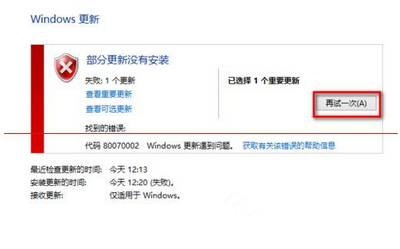
免費升級 Win10 時若遇到錯誤碼 0x80244021 (80244021),代表 Windows Update 元件異常。微軟官方建議透過「停止服務 → 刪除暫存檔 → 重啟服務」三步驟修復,安全且有效。
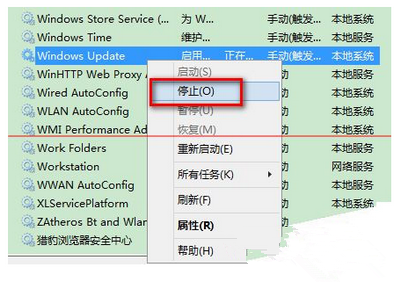
步驟一:停止 Windows Update 服務
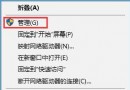
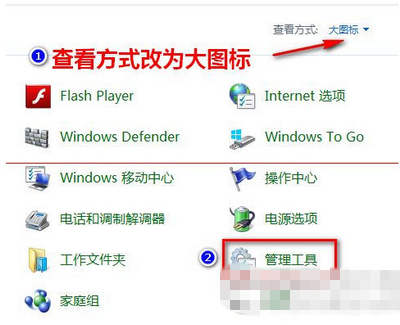
- 開啟「控制台」→ 檢視模式改為「大圖示」→ 點選「管理工具」。
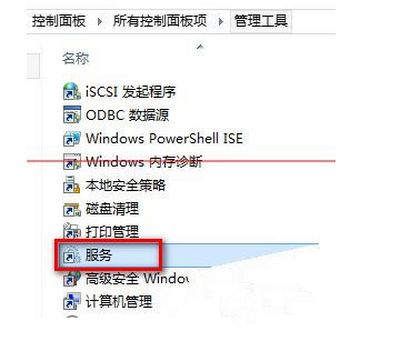
- 雙擊「服務」。
- 找到 Windows Update → 右鍵選擇「停止」。
步驟二:刪除軟體發佈暫存資料夾
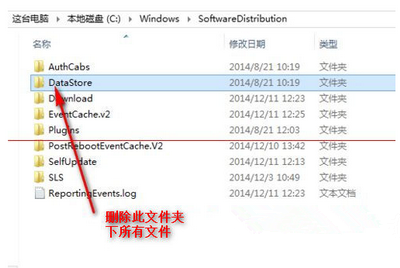
- 開啟檔案總管,前往
C:\Windows\SoftwareDistribution。
- 進入 DataStore 資料夾,全選刪除所有檔案與子資料夾(若提示需管理員權限,點「繼續」)。
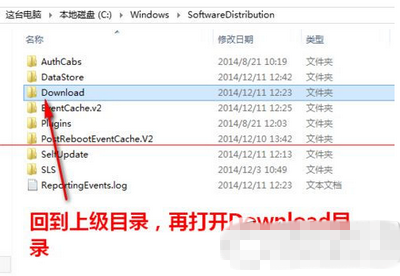
- 返回上層,進入 Download 資料夾,同樣全選刪除所有內容。
步驟三:重新啟動 Windows Update 服務
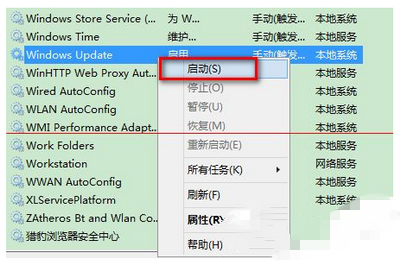
- 回到「服務」視窗,右鍵「Windows Update」→ 選擇「啟動」。
- 關閉所有視窗,重新檢查更新,錯誤碼 80244021 應已解決。
適用範圍與注意事項
- 適用錯誤碼:
WindowsUpdate_80244021 / 0x80244021
- 此為微軟官方建議流程,不會損害系統安全。
- 若仍無法解決,可嘗試下載 ISO 映像檔全新安裝。