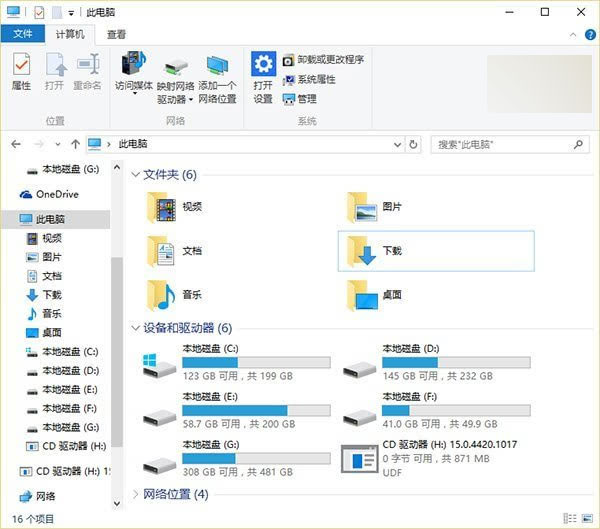
資源管理員「此電腦 > 裝置與磁碟機」常被第三方軟體植入捷徑,若項目過多逐一移除太麻煩,可透過登錄表一次清除。
▲ 完全刪除第三方項目鍵值後的狀態
⚠ 操作前建議用「軟媒魔方 清理大師」備份登錄表,防誤操作。
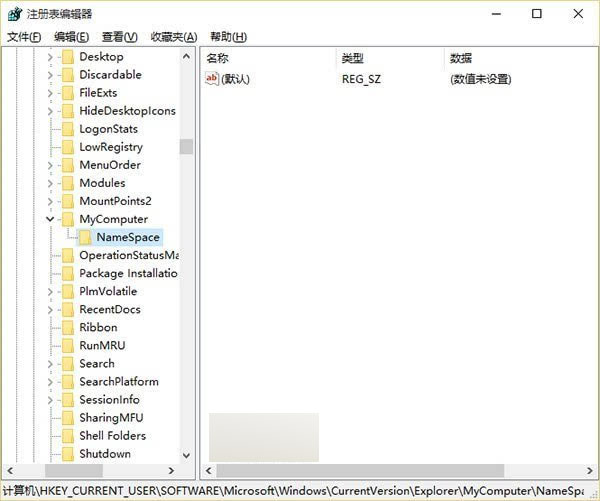
regedit
HKEY_CURRENT_USER\SOFTWARE\Microsoft\Windows\CurrentVersion\Explorer\MyComputer\NameSpace
若誤刪需求項目,可用備份還原登錄表。
筆記型電腦 Windows 7 設定自動睡眠/休眠時間完整教學
Win8.1 執行阿里旺旺提示異常代碼 c0000005?相容模式設為 Win7 解決
《我的世界》PC/Mac 版用戶免費獲取 Win10 Beta 版:Win10 商店已上架
Win10 內置截圖工具完整使用教程:四種模式 + 筆跡標註 + 保存位置
Win10 激活失敗 0xC004C003?官方說法:耐心等待伺服器恢復
蘿蔔家園 Windows 7 強制關機後無法開機?三種修復方案
Win7 自動更新失敗無法進入系統?兩種修復方案(安全模式/系統還原)
Win7 工作列顯示農曆:用「魔方小助手」接管系統時間區