微軟向 Xbox One 玩家開放遊戲串流至 Win10 PC/平板,支援有線、Wi-Fi 輸出。預設僅低/中/高三種畫質,實現 720P 無壓力,但大神發現可解鎖 1080P。
據 Reddit Xbox One 玩家分享,修改一項鍵值即可解鎖畫質限制。
詳細步驟
- 擁有 Xbox One 主機,與 Win10 PC 同網路環境。
- 開啟 Win10 版《Xbox》應用,登入相同 Xbox One 帳號,測試串流服務。
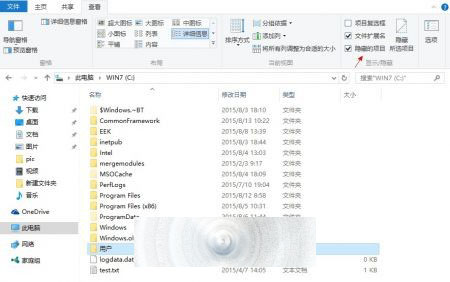
- 定位路徑:
C:/Users/用戶名/AppData/Local/Packages/(需顯示「隱藏項目」)。
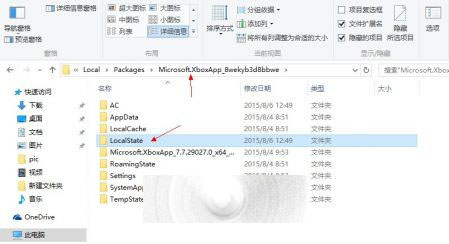
- 找到 Microsoft.XboxApp_XXXXXXXX 資料夾 →
LocalState/userconsoledata 檔案。
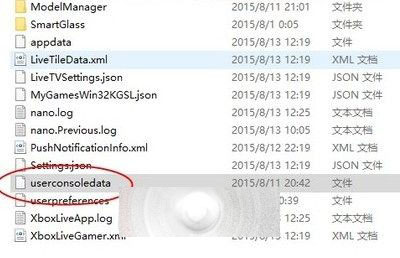
- 以記事本開啟 userconsoledata,將 IsInternalPreview false 改為 true,儲存。
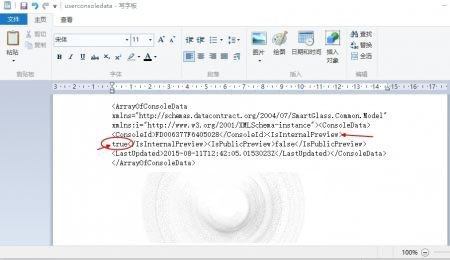
- 註:若無此檔,先在 Xbox App 中修改畫質,Win10 會自動產生。
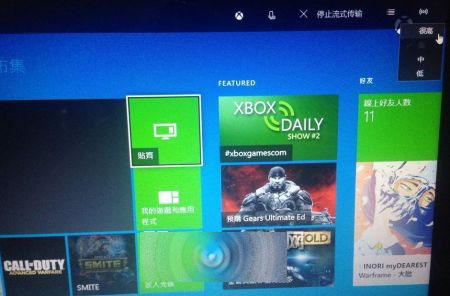
- 重啟 Win10 版《Xbox》,連接 Xbox One 串流,右上角可選「很高畫質」,頻寬提升至 30Mbps(3.5MB/s),實現 1080P 輸出。