Windows XP Windows 7 Windows 2003 Windows Vista Windows 綜合教學 Linux 系統教學
Windows 10 Windows 8 Windows 2008 Windows NT Windows Server 電腦軟體教學
您现在的位置: Windows教程網 >> Windows教程 >  >> Windows 綜合教學 >> 關於 Windows

Win8 企業版插入 Windows To Go 隨身碟不顯示?磁碟管理指派磁碟機代號解決

編輯:關於 Windows

Win8 企業版 Windows To Go 隨身碟插入不顯示?指派磁碟機代號使其顯示

官方 WTG 建立的工作區插入執行中 Windows 預設隱藏 (防資料外洩),需手動指派磁碟機代號才能存取資料。
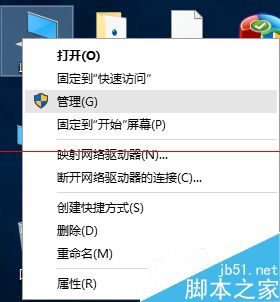
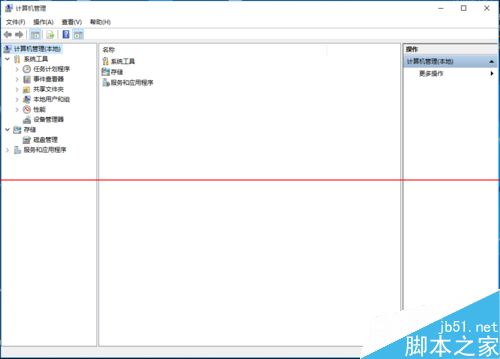
  1. 右鍵「這台電腦」/「電腦」/「我的電腦」 → 「管理」進入電腦管理。
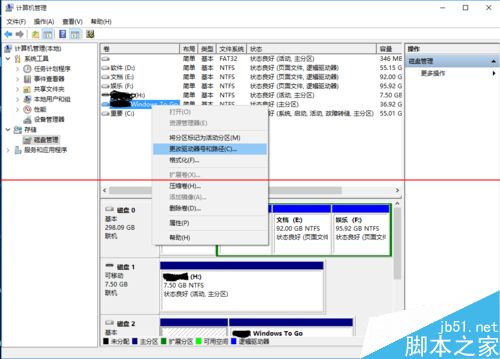
  2. 選擇「磁碟管理」 → 找到 WTG 隨身碟分區 (可能有系統保留與系統檔案兩個分區,選容量符合者) → 右鍵「變更磁碟機代號和路徑」。
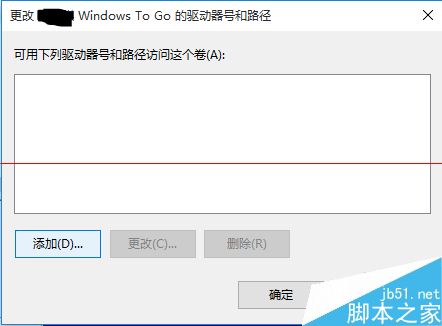
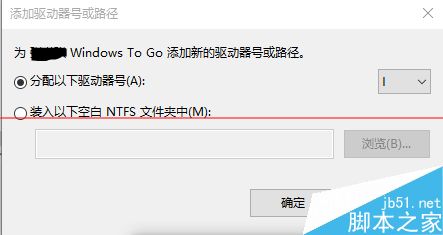
  3. 點選「新增」 → 指派一個磁碟機代號 → 確定。
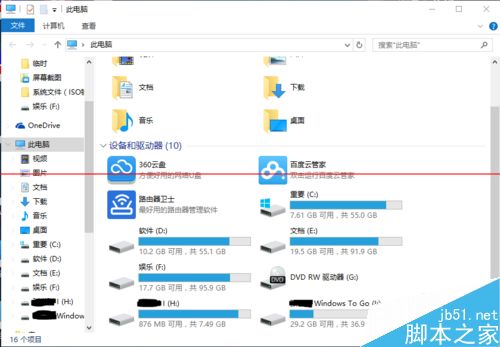
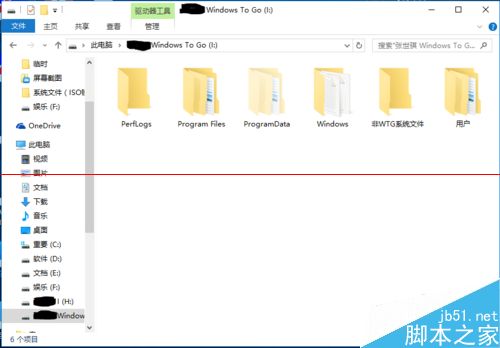
  4. 重新開啟「這台電腦」即可看到隨身碟並可寫入檔案 (若有 BitLocker 需輸入密碼)。

相關推薦

  • Windows To Go 隨身碟無法開機解決方法圖文詳細介紹
  • Win10 專業版/家庭版怎麼使用 Windows To Go 功能?
  • Windows To Go 隨身碟沒有磁碟代號 (無法自動指派磁碟代號)
Copyright © Windows教程網 All Rights Reserved