Windows XP Windows 7 Windows 2003 Windows Vista Windows 綜合教學 Linux 系統教學
Windows 10 Windows 8 Windows 2008 Windows NT Windows Server 電腦軟體教學
您现在的位置: Windows教程網 >> Windows教程 >  >> Windows 綜合教學 >> 關於 Windows

Win10 忘記 PIN 碼怎麼辦?在「設定」→「帳戶」→「登入選項」重設 PIN

編輯:關於 Windows

Windows 10 使用 PIN 碼登入時若忘記密碼,可透過 Microsoft 帳戶密碼驗證身分後重新設定 PIN,無需重裝系統。

重設步驟

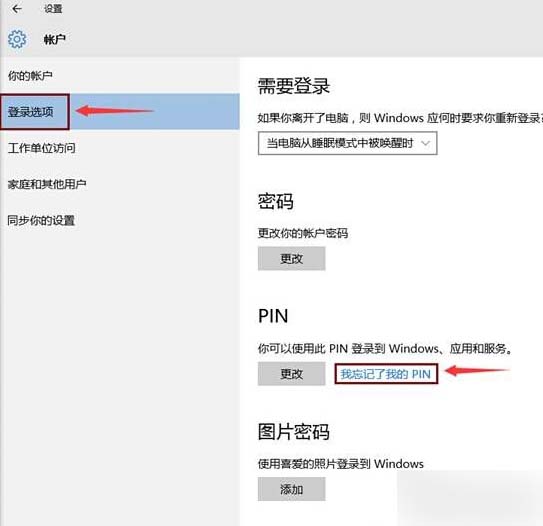
  1. 「開始」→「設定」→「帳戶」。
  2. 左側選擇「登入選項」,右側點選「我忘記我的 PIN」。
    登入選項忘記PIN
  3. 彈出確認視窗點選「繼續」。
  4. 輸入 Microsoft 帳戶密碼(Outlook/Hotmail/Live 信箱密碼)驗證身分。
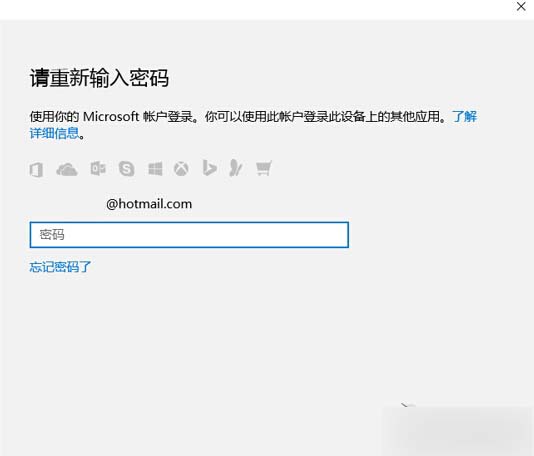
    輸入Microsoft帳戶密碼
  5. 驗證通過後,即可設定新的 PIN 碼(建議 4-6 位數字,或勾選「包含字母與符號」設定更複雜 PIN)。

    設定新PIN

若使用本地帳戶(非 Microsoft 帳戶),則無法透過此方式重設,需使用密碼重設磁碟或進入安全模式透過內建 Administrator 帳戶重設密碼。

Copyright © Windows教程網 All Rights Reserved