Windows XP Windows 7 Windows 2003 Windows Vista Windows 綜合教學 Linux 系統教學
Windows 10 Windows 8 Windows 2008 Windows NT Windows Server 電腦軟體教學
您现在的位置: Windows教程網 >> Windows教程 >  >> Windows 綜合教學 >> 關於 Windows

Win7 註冊表修改:在右鍵選單新增「用 Notepad++ 開啟」

編輯:關於 Windows

透過修改登錄檔,可為所有檔案類型的右鍵選單添加 Notepad++ 快速開啟選項。

步驟

  1. 執行 regedit 開啟登錄編輯器。
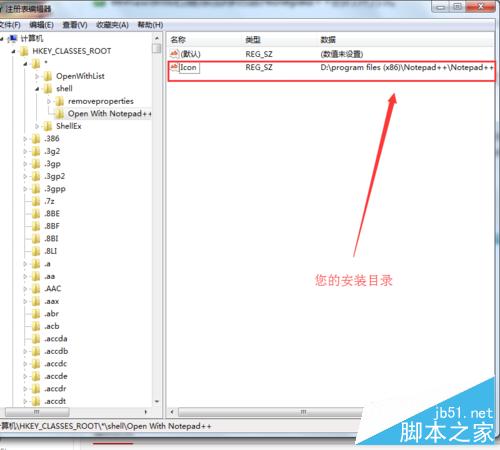
  2. 定位至 HKEY_CLASSES_ROOT\*\Shell,在 Shell 下新增項目命名為 Open With Notepad++。
  3. 在該項目右側新增字串值:
    名稱:Icon
    值:Notepad++ 執行檔完整路徑(如 D:\Program Files (x86)\Notepad++\Notepad++.exe)。
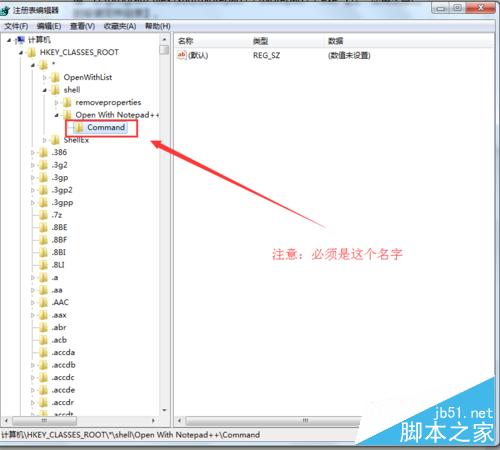
  4. 在 Open With Notepad++ 下新增項目 Command(名稱固定)。
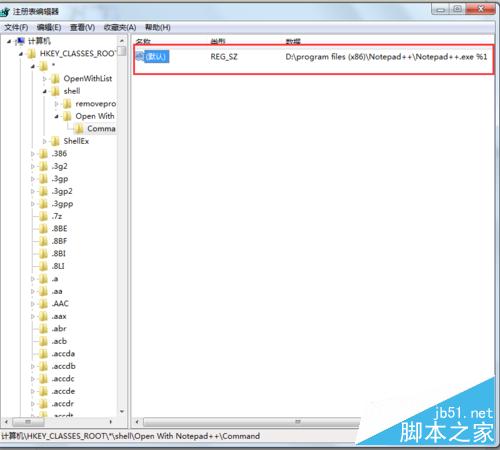
  5. 修改 Command 預設值為:"D:\Program Files (x86)\Notepad++\Notepad++.exe" %1(路徑請依實際安裝位置調整)。
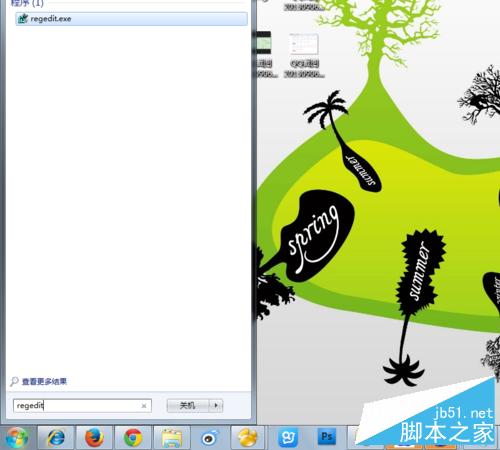
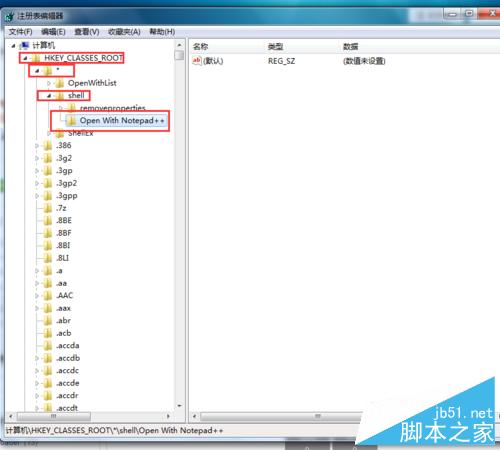
regedit 開啟登錄編輯器 HKEY_CLASSES_ROOT\*\Shell 新增項目 新增 Icon 字串值 新增 Command 子項目 修改 Command 預設值

注意: * 也是一個項目;路徑必須使用自己的安裝目錄;Command 名稱不可更改。
Copyright © Windows教程網 All Rights Reserved