Win10 應用程式商店、Modern 應用程式閃退最新官方解法:確保 Windows License Manager Service (WLMS) 服務正在執行且啟動類型為「自動」。此服務為應用程式商店提供基礎架構支援,停用將導致所有商店內容無法執行。
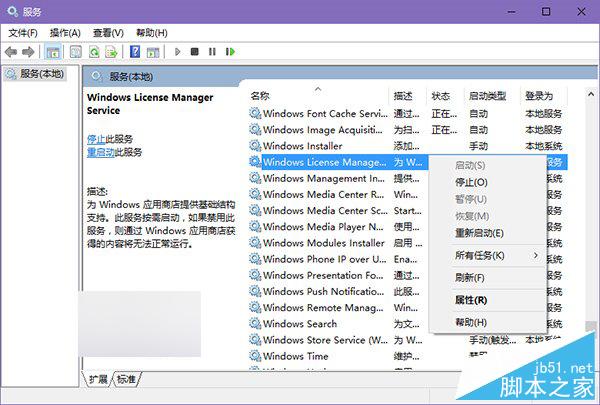
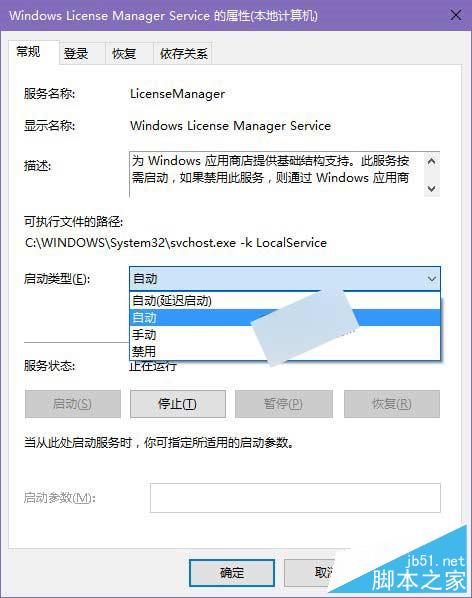
完成後重新啟動應用程式商店與受影響 App,閃退問題通常即可解決。若無效,建議執行 wsreset.exe 重設商店快取或重新註冊所有 UWP 應用程式。
Win10 變更桌面資料夾路徑至非系統盤:右鍵桌面→屬性→位置→移動,減輕系統盤壓力提升開關機速度
Win7 更換桌面背景圖片/主題兩大方法:個人化設定法與瀏覽圖片另存為背景法
Win10 週年更新 14393.447 累積更新 KB3200970 修復內容完整彙總
Win7 淘寶購物提示 Aliedit.dll 遺失?三步註冊修復安全外掛
Win7 使用 CMD 指令刪除 Windows.old 舊系統資料夾釋放磁碟空間
Win7 找不到 NVIDIA 控制台?更新驅動、啟動服務、檢查啟動項三步驟找回